It’s relatively straight forward to write to a table from an SSRS report once you realise that every time a report is refreshed it tries to run any code it finds in its datasets. This gives us the opportunity to go “off campus”.
Consider a report with a drop-down list called “Change”, containing three choices “View” (the default), “Add”, and “Remove”. And a dataset containing …
    IF @Change = 'ADD'
        INSERT INTO [dbo].[SomeTable]
        VALUES (@Param1, @Param2);

    IF @Change = 'REMOVE'
        DELETE FROM [dbo].[SomeTable]
        WHERE Column1 = @Param1
		AND Column2 = @Param2;

	SELECT * FROM [dbo].[SomeTable];
You could open the report. Paste some values into Param1 and Param2. Choose “Add” from the drop-down. Then click “Refresh Report”.
Although I cannot show the slow report that returned 4729 pages (shame ;)) I can use the generic ReportServer database for a demo.
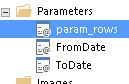
It’s all about timing. First we need a parameter called param_rows that is an integer with a default value of -say- 100.
Next we need a dataset where param_rows is nested …
-- SlowestReports.sql

DECLARE @Rows INT = COALESCE(@param_rows, 100)

SELECT TOP(@Rows) ItemPath Report,
       TimeStart,
       TimeDataRetrieval
FROM [ReportServer].[dbo].[ExecutionLog3]
WHERE ItemPath <> ''
AND ItemAction = 'Render'
AND RequestType = 'Interactive'
AND Status = 'rsSuccess'
AND TimeStart BETWEEN @FromDate AND @ToDate + 1
ORDER BY TimeDataRetrieval DESC;
Then we can abuse the date range, with performance balanced by the number of rows returned (unlike “Filter” which returns all the rows but limits those displayed) …
Ok abuse doesn’t really work with ReportServer (that only holds 60 days by default) but you get the idea 🙂
There are many posts on how to automatically generate of a PDF receipt and email it by leveraging SSRS. Here is how it went for me.
Create a report that shows the details required.
Create a parameters table.
Subscribe to the report using the parameters table.
Create a stored-procedure to populate and fire the subscription.
On a version of SQL Server Reporting Services (SSRS) that supports data-driven-subscriptions (DDS) I created a report called ‘SingleInvoice’ with one input parameter ‘invoice number’.
Outside of this report, in preparation for the DDS, I created a data source pointing to the local [ReportServer] database.
Within the [ReportServer] database I created a table called [dbo].[InvoiceParams]
CREATE TABLE [dbo].[InvoiceParams](
	[InvoiceNumber] [VARCHAR](100) NULL,
	[ToEmailAddress] [VARCHAR](200) NULL,
	[CCEmailAddress] [VARCHAR](200) NULL,
	[BccEmailAddress] [VARCHAR](200) NULL,
	[ReplyToEmailAddress] [VARCHAR](200) NULL,
	[IncludeReport] [BIT] NULL,
	[RenderFormat] [VARCHAR](20) NULL,
	[Priority] [VARCHAR](15) NULL,
	[Subject] [VARCHAR](150) NULL,
	[Comment] [VARCHAR](150) NULL,
	[IncludeLink] [BIT] NULL,
	[Active] [BIT] NULL,
	[DateInserted] [DATETIME] NOT NULL
) ON [PRIMARY]
GO

ALTER TABLE [dbo].[InvoiceParams] ADD  DEFAULT (NULL) FOR [CCEmailAddress]
ALTER TABLE [dbo].[InvoiceParams] ADD  DEFAULT (NULL) FOR [BccEmailAddress]
ALTER TABLE [dbo].[InvoiceParams] ADD  DEFAULT (NULL) FOR [ReplyToEmailAddress]
ALTER TABLE [dbo].[InvoiceParams] ADD  DEFAULT ((1)) FOR [IncludeReport]
ALTER TABLE [dbo].[InvoiceParams] ADD  DEFAULT ('PDF') FOR [RenderFormat]
ALTER TABLE [dbo].[InvoiceParams] ADD  DEFAULT ('Normal') FOR [Priority]
ALTER TABLE [dbo].[InvoiceParams] ADD  DEFAULT ((0)) FOR [IncludeLink]
ALTER TABLE [dbo].[InvoiceParams] ADD  DEFAULT ((1)) FOR [Active]
ALTER TABLE [dbo].[InvoiceParams] ADD  DEFAULT (GETDATE()) FOR [DateInserted]
GO
To simplify the stored procedure I defined default values for all the columns I would not be dynamically populating.
Next I created a Data-driven subscription on the report with a schedule in the past – so it would never fire. For Destination I chose E-Mail.
Within the subscription I edited the dataset and chose the previously created shared data source [ReportServer].
I added this query before clicking ‘Apply’….
SELECT *
FROM dbo.InvoiceParams
WHERE Active = 1;
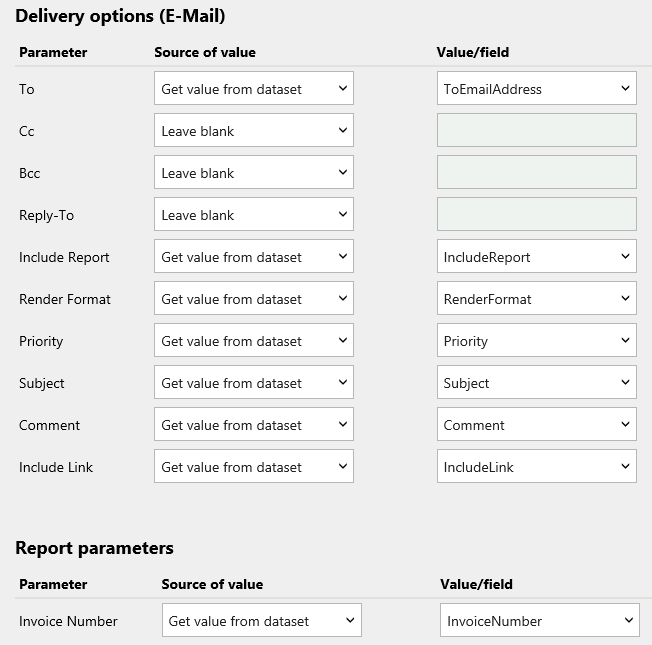
Back in the New Subscription form, I completed the Delivery options like this …
Within the user database I created this stored-procedure …
/*==================================================
  Author:		Richard Smith
  Create date:	10 Jul 2020
  Description:	To Email PDF receipts - demo version
  Test: Exec [dbo].[EmailReceipts] 'INV123456789',
            'Richard.Smith@company.com'
  =================================================*/

ALTER PROC [dbo].[EmailReceipts]
    @InvoiceNumber VARCHAR(100),
    @ToEmailAddress VARCHAR(200),
    @Subject VARCHAR(150) = 'test subject',
    @Comment VARCHAR(150) = 'test body',
    @SubscriptionID NVARCHAR(260) = '987654321'
                       /* Report = "SingleInvoice" */
AS
BEGIN
    SET NOCOUNT ON;


/* 1 Save the inputs */

    INSERT INTO [ReportServer].[dbo].[InvoiceParams]
            (InvoiceNumber, ToEmailAddress, [Subject], Comment)
    VALUES (@InvoiceNumber, @ToEmailAddress, @Subject, @Comment);


/* 2 Trigger subscription. Which will send the report (+ inputs) to the email-subsystem-queue */

    EXEC [ReportServer].[dbo].[AddEvent] @EventType = 'TimedSubscription', @EventData = @SubscriptionID;
    WAITFOR DELAY '00:00:10';


/* 3 If no longer in queue, flag as sent */

    IF NOT EXISTS (SELECT 1 FROM [ReportServer].[dbo].[Event] WHERE EventData = @SubscriptionID)
        UPDATE [ReportServer].[dbo].[InvoiceParams]
        SET Active = 0
        WHERE InvoiceNumber = @InvoiceNumber
        AND ToEmailAddress = @ToEmailAddress;


/* 4 Manage the log */

	DELETE FROM [ReportServer].[dbo].[InvoiceParams] WHERE DateInserted < GETDATE()-30;
	SELECT * FROM [ReportServer].[dbo].[InvoiceParams] ORDER BY DateInserted DESC;

END;
GO
When executed with an email address and invoice number this stored procedure will send an email to the email address with the PDF invoice attached.
NOTE
To find @SubcriptionID I used this …
SELECT SCH.SubscriptionID
FROM [ReportServer].[dbo].[Catalog] CAT
JOIN [ReportServer].[dbo].[ReportSchedule] SCH
  ON CAT.ItemID = SCH.ReportID
WHERE CAT.Path= '/ReportPath/ReportName';
When an email server failed overnight I used this script to generate the commands to re-send reports to subscribers …
-- RerunFailedSubscriptions.sql

-- generate the commands to resend report-emails that failed for some reason

select s.LastStatus, LastRunTime, 'exec sp_start_job @job_name = ''' + cast(j.name as varchar(40)) + '''' [Command To Re-run the Job]
from msdb.dbo.sysjobs j
join  msdb.dbo.sysjobsteps js on js.job_id = j.job_id
join  [ReportServer$REPORTS].[dbo].[Subscriptions] s  on js.command like '%' + cast(s.subscriptionid as varchar(40)) + '%'
where s.LastStatus like 'Failure sending mail%';
A customer had many copies of the same report – one for each site. And the application database had multiple copies of each table – one for each site. The table names were all appended with the sites name EG: “WP London_SalesHeader”, “WP Barcelona_SalesHeader” etc.
In Report Manager there was a folder for each site, containing sub-folders for different categories of report (EG: /London/Sales, OR /London/Production).
This is a simplified account of how I created a Report that returned only information specific to its location.
In Report Builder I created a hidden parameter called @site of type Text with no “Available Values” and its “Default Values” using the global variable ReportFolder.
As the output from this built-in variable would be like “\Paris\Sales” I had to create an expression for the “Default Value” of @site searching through each site name in turn …



 Database Consultant