ORDER BY CASE

In TSQL I recently discovered how to use the CASE command in the ORDER BY clause to sort results in custom ways.

For example, to order countries with the UK and USA at the top then the rest alphabetically would in the past have caused me to either generate a calculated ‘CountrySort’ column or UNION two queries.

Now I can do this …

ORDER BY CASE
		WHEN countryid = 1 THEN 'AAA'
		WHEN countryid = 23 THEN 'AAB'
		ELSE countryname END

Which translates as …

‘Order by countryname
having first replaced the countryname with ‘AAA’ where the countryid is 1
and ‘AAB’ where its 23′.

Here are the results (including countryid for clarity)…

countrysort

Column Max Length

From my “Spreadsheet sizer” script, this one helped me move sensibly away from pesky varchar(max) columns.

-- ColumnMaxLength.sql

DECLARE @TableName VARCHAR(255) = 'customers' --<< input
DECLARE @SchemaName VARCHAR(255) = 'dbo' 
DECLARE @sqlcmd varchar(max) 

select @sqlcmd = stuff((SELECT ' union all
select ' 
+ QUOTENAME(table_schema,'''') + ' [Schema], ' 
+ QUOTENAME(TABLE_NAME,'''') + ' [Table], ' 
+ quotename(column_name,'''') + ' [Column],
max(datalength(' + quotename(column_name) + ')) MaxLength 
from ' + quotename(table_schema) + '.' + quotename(table_name)
from information_schema.columns
where 1=1
AND table_name =  @TableName
AND table_schema = @SchemaName
order by column_name
for xml path(''),type).value('.','varchar(max)'),1,11,'')

exec(@sqlcmd)

Comparing Stored-Procedures

Had a bit of a problem today with the re-write project.

I had been checking new stored-procedures in the DEV database, and (if good) pasting them into the WEB database.

The issue was that some DEV stored-procedures that I had already checked-in to WEB had been modified again.

Rather than trying to enforce version-control (mmm), or download Redgate’s SQL Compare, I modified my ‘Whats New” routine to compare the modify-dates between the DEV and WEB databases.

-- CompareSP.sql

SELECT [dev].[type_desc],
       (SELECT [name] FROM [companydev].[sys].[schemas] WHERE [schema_id] = [dev].[schema_id]) [schema],
       CASE [dev].[parent_object_id]
           WHEN '0' THEN [dev].[name]
           ELSE OBJECT_NAME([dev].[parent_object_id]) + '.' + [dev].[name]
       END [object_name],
       [dev].[create_date],
       [dev].[modify_date], -- or create-date if there isn't one
	   '' v,
	   [web].[modify_date] web_modify_date , 
	   DATEDIFF(MINUTE, [dev].[modify_date], [web].[modify_date]) mod_diff
FROM [companydev].[sys].[objects] dev
JOIN [companyweb].[sys].[objects] web
  ON [dev].[name] = [web].[name]
WHERE [dev].[is_ms_shipped] = 0 -- exclude system-objects
AND [dev].[type] = 'P' -- just stored-procedures
--AND [dev].[modify_date] > '21 nov 2018'
ORDER BY [dev].[modify_date] DESC;

Adding a NOT NULL column to an existing table

-- AddingNotNullColumnToExistingTable.sql

-- 1. Add new column to the old table, as NULL for now

	ALTER TABLE [dbo].[TableName] 
	ADD [ColumnName] INT NULL

-- 2. Set the default to zero for new rows

	ALTER TABLE [dbo].[TableName] 
	ADD CONSTRAINT [DF_TableName_ColumnName] 
	DEFAULT(0) FOR [ColumnName]

-- 3. Change all existing null values to zeros

	UPDATE [dbo].[TableName] 
	SET [ColumnName] = 0 
	WHERE [ColumnName] IS NULL

-- 4. Change column from NULL to NOT NULL

	ALTER TABLE [dbo].[TableName] 
	ALTER COLUMN [ColumnName] INT NOT NULL

-- Undo (while testing)

	ALTER TABLE [dbo].[TableName] 
	DROP CONSTRAINT [DF_TableName_ColumnName]

	ALTER TABLE [dbo].[TableName] 
	DROP COLUMN [ColumnName]

Calendar UK

Must be that time of year again :). Adapted from Aaron’s beautiful US calendar script …

-- CalendarUK.sql
use [Dev];

-- initialize period

	DECLARE @StartDate DATE = '20000101', @NumberOfYears INT = 30;

-- prevent set or regional settings from interfering with 
-- interpretation of dates / literals

	SET DATEFIRST 7; -- sunday is the first day of week
	SET DATEFORMAT mdy; -- thats month/day/year
	SET LANGUAGE US_ENGLISH;

	DECLARE @CutoffDate DATE = DATEADD(YEAR, @NumberOfYears, @StartDate);

-- 1. this is just a holding table for intermediate calculations:

	IF OBJECT_ID('tempdb..#cal') IS NOT NULL DROP TABLE #cal
	CREATE TABLE #cal
	(
	  [date]       DATE PRIMARY KEY, 
	  [day]        AS DATEPART(DAY,      [date]),
	  [month]      AS DATEPART(MONTH,    [date]),
	  FirstOfMonth AS CONVERT(DATE, DATEADD(MONTH, DATEDIFF(MONTH, 0, [date]), 0)),
	  [MonthName]  AS DATENAME(MONTH,    [date]),
	  [week]       AS DATEPART(WEEK,     [date]),
	  [ISOweek]    AS DATEPART(ISO_WEEK, [date]),
	  [DayOfWeek]  AS DATEPART(WEEKDAY,  [date]),
	  [quarter]    AS DATEPART(QUARTER,  [date]),
	  [year]       AS DATEPART(YEAR,     [date]),
	  FirstOfYear  AS CONVERT(DATE, DATEADD(YEAR,  DATEDIFF(YEAR,  0, [date]), 0)),
	  Style112     AS CONVERT(CHAR(8),   [date], 112),
	  Style101     AS CONVERT(CHAR(10),  [date], 101)
	);

-- use the catalog views to generate as many rows as we need

	INSERT #cal([date]) 
	SELECT d
	FROM
	(
	  SELECT d = DATEADD(DAY, rn - 1, @StartDate)
	  FROM 
	  (
		SELECT TOP (DATEDIFF(DAY, @StartDate, @CutoffDate)) 
		  rn = ROW_NUMBER() OVER (ORDER BY s1.[object_id])
		FROM sys.all_objects AS s1
		CROSS JOIN sys.all_objects AS s2
		ORDER BY s1.[object_id]
	  ) AS x
	) AS y;

-- 2. create the real table

	IF OBJECT_ID('dbo.CalendarUK') IS NOT NULL DROP TABLE dbo.CalendarUK
	CREATE TABLE [dbo].[CalendarUK]
	(
	  DateKey             INT         NOT NULL PRIMARY KEY,
	  [Date]              DATE        NOT NULL,
	  [Day]               TINYINT     NOT NULL,
	  DaySuffix           CHAR(2)     NOT NULL,
	  [Weekday]           TINYINT     NOT NULL,
	  WeekDayName         VARCHAR(10) NOT NULL,
	  IsWeekend           BIT         NOT NULL,
	  IsHoliday           BIT         NOT NULL,
	  HolidayText         VARCHAR(64) SPARSE,
	  DOWInMonth          TINYINT     NOT NULL,
	  [DayOfYear]         SMALLINT    NOT NULL,
	  WeekOfMonth         TINYINT     NOT NULL,
	  WeekOfYear          TINYINT     NOT NULL,
	  ISOWeekOfYear       TINYINT     NOT NULL,
	  [Month]             TINYINT     NOT NULL,
	  [MonthName]         VARCHAR(10) NOT NULL,
	  [Quarter]           TINYINT     NOT NULL,
	  QuarterName         VARCHAR(6)  NOT NULL,
	  [Year]              INT         NOT NULL,
	  MMYYYY              CHAR(6)     NOT NULL,
	  MonthYear           CHAR(7)     NOT NULL,
	  FirstDayOfMonth     DATE        NOT NULL,
	  LastDayOfMonth      DATE        NOT NULL,
	  FirstDayOfQuarter   DATE        NOT NULL,
	  LastDayOfQuarter    DATE        NOT NULL,
	  FirstDayOfYear      DATE        NOT NULL,
	  LastDayOfYear       DATE        NOT NULL,
	  FirstDayOfNextMonth DATE        NOT NULL,
	  FirstDayOfNextYear  DATE        NOT NULL
	);
	GO

-- 3 populate the real table from the temp table

	INSERT dbo.CalendarUK WITH (TABLOCKX)
	SELECT
	  DateKey     = CONVERT(INT, Style112),
	  [Date]        = [date],
	  [Day]         = CONVERT(TINYINT, [day]),
	  DaySuffix     = CONVERT(CHAR(2), CASE WHEN [day] / 10 = 1 THEN 'th' ELSE 
					  CASE RIGHT([day], 1) WHEN '1' THEN 'st' WHEN '2' THEN 'nd' 
					  WHEN '3' THEN 'rd' ELSE 'th' END END),
	  [Weekday]     = CONVERT(TINYINT, [DayOfWeek]),
	  [WeekDayName] = CONVERT(VARCHAR(10), DATENAME(WEEKDAY, [date])),
	  [IsWeekend]   = CONVERT(BIT, CASE WHEN [DayOfWeek] IN (1,7) THEN 1 ELSE 0 END),
	  [IsHoliday]   = CONVERT(BIT, 0),
	  HolidayText   = CONVERT(VARCHAR(64), NULL),
	  [DOWInMonth]  = CONVERT(TINYINT, ROW_NUMBER() OVER 
					  (PARTITION BY FirstOfMonth, [DayOfWeek] ORDER BY [date])),
	  [DayOfYear]   = CONVERT(SMALLINT, DATEPART(DAYOFYEAR, [date])),
	  WeekOfMonth   = CONVERT(TINYINT, DENSE_RANK() OVER 
					  (PARTITION BY [year], [month] ORDER BY [week])),
	  WeekOfYear    = CONVERT(TINYINT, [week]),
	  ISOWeekOfYear = CONVERT(TINYINT, ISOWeek),
	  [Month]       = CONVERT(TINYINT, [month]),
	  [MonthName]   = CONVERT(VARCHAR(10), [MonthName]),
	  [Quarter]     = CONVERT(TINYINT, [quarter]),
	  QuarterName   = CONVERT(VARCHAR(6), CASE [quarter] WHEN 1 THEN 'First' 
					  WHEN 2 THEN 'Second' WHEN 3 THEN 'Third' WHEN 4 THEN 'Fourth' END), 
	  [Year]        = [year],
	  MMYYYY        = CONVERT(CHAR(6), LEFT(Style101, 2)    + LEFT(Style112, 4)),
	  MonthYear     = CONVERT(CHAR(7), LEFT([MonthName], 3) + LEFT(Style112, 4)),
	  FirstDayOfMonth     = FirstOfMonth,
	  LastDayOfMonth      = MAX([date]) OVER (PARTITION BY [year], [month]),
	  FirstDayOfQuarter   = MIN([date]) OVER (PARTITION BY [year], [quarter]),
	  LastDayOfQuarter    = MAX([date]) OVER (PARTITION BY [year], [quarter]),
	  FirstDayOfYear      = FirstOfYear,
	  LastDayOfYear       = MAX([date]) OVER (PARTITION BY [year]),
	  FirstDayOfNextMonth = DATEADD(MONTH, 1, FirstOfMonth),
	  FirstDayOfNextYear  = DATEADD(YEAR,  1, FirstOfYear)
	FROM #cal
	OPTION (MAXDOP 1);

-- 4 add holidays

	;WITH x AS 
	(
	  SELECT DateKey, [Date], IsHoliday, HolidayText, FirstDayOfYear,
		DOWInMonth, [MonthName], [WeekDayName], [Day],
		LastDOWInMonth = ROW_NUMBER() OVER 
		(
		  PARTITION BY FirstDayOfMonth, [Weekday] 
		  ORDER BY [Date] DESC
		)
	  FROM dbo.CalendarUK
	)
	UPDATE x SET IsHoliday = 1, HolidayText = CASE
	  WHEN ([Date] = FirstDayOfYear) THEN 'New Years Day'
	  WHEN ([DOWInMonth] = 3 AND [MonthName] = 'April' AND [WeekDayName] = 'Friday') THEN 'Good Friday'                  -- (3rd Monday in January)
	  WHEN ([DOWInMonth] = 1 AND [MonthName] = 'May' AND [WeekDayName] = 'Monday') THEN 'May Day'                        -- (first Monday in May)
	  WHEN ([LastDOWInMonth] = 1 AND [MonthName] = 'May' AND [WeekDayName] = 'Monday') THEN 'May Bank Holiday'           -- (last Monday in May)
	  WHEN ([LastDOWInMonth] = 1 AND [MonthName] = 'August' AND [WeekDayName] = 'Monday') THEN 'August Bank Hoiliday'    -- (last Monday in August)
	  WHEN ([MonthName] = 'December' AND [Day] = 25) THEN 'Christmas Day'
	  WHEN ([MonthName] = 'December' AND [Day] = 26) THEN 'Boxing Day'
	  END
	WHERE -- IsHoliday
	  ([Date] = FirstDayOfYear)
	  OR ([LastDOWInMonth] = 1 AND [MonthName] = 'May' AND [WeekDayName] = 'Monday')
	  OR ([DOWInMonth] = 1     AND [MonthName] = 'May' AND [WeekDayName] = 'Monday')
	  OR ([LastDOWInMonth] = 1 AND [MonthName] = 'August'    AND [WeekDayName] = 'Monday')
	  OR ([MonthName] = 'December' AND [Day] = 25)
	  OR ([MonthName] = 'December' AND [Day] = 26);


-- 5. create a function to calculate easter etc

	IF OBJECT_ID('dbo.GetEasterHolidays') IS NOT NULL DROP FUNCTION dbo.GetEasterHolidays
	GO

	CREATE FUNCTION dbo.GetEasterHolidays(@year INT) 
	RETURNS TABLE
	WITH SCHEMABINDING
	AS 
	RETURN 
	(
	  WITH x AS 
	  (
		SELECT [Date] = CONVERT(DATE, RTRIM(@year) + '0' + RTRIM([Month]) 
			+ RIGHT('0' + RTRIM([Day]),2))
		  FROM (SELECT [Month], [Day] = DaysToSunday + 28 - (31 * ([Month] / 4))
		  FROM (SELECT [Month] = 3 + (DaysToSunday + 40) / 44, DaysToSunday
		  FROM (SELECT DaysToSunday = paschal - ((@year + @year / 4 + paschal - 13) % 7)
		  FROM (SELECT paschal = epact - (epact / 28)
		  FROM (SELECT epact = (24 + 19 * (@year % 19)) % 30) 
			AS epact) AS paschal) AS dts) AS m) AS d
	  )
	  SELECT DATEADD(DAY,-2,[Date]) [Date], 'Good Friday' HolidayName FROM x
		UNION ALL SELECT DATEADD(DAY, 1,[Date]), 'Easter Monday' FROM x
	  );
	GO

-- 6. use the function to insert easter etc

	;WITH x AS 
	(
	  SELECT d.[Date], d.IsHoliday, d.HolidayText, h.HolidayName
		FROM dbo.CalendarUK AS d
		CROSS APPLY dbo.GetEasterHolidays(d.[Year]) AS h
		WHERE d.[Date] = h.[Date]
	)
	UPDATE x SET IsHoliday = 1, HolidayText = HolidayName;

-- 7. show results

	SELECT * 
	FROM dbo.CalendarUK
	WHERE [year] = '2019'
	--WHERE [year] in ('2019', '2020')
	AND (IsHoliday = 1
	OR HolidayText IS NOT NULL)
	--and DateKey = '20181231'
RCSI testing

Here’s some code to create a large number of ghost records.

--rcsi_testing.sql

-- create and populate a test table

CREATE TABLE dbo.demo_table
  (
      ID    INT       NOT NULL    IDENTITY (1, 1),
      C1    CHAR(100) NOT NULL
  );
  GO
   
  INSERT INTO dbo.demo_table (C1)
  SELECT TOP (1000)
         CAST(TEXT AS CHAR(100)) AS C1
  FROM   sys.messages
  WHERE  language_id = 1031;
  GO
    
  CREATE UNIQUE CLUSTERED INDEX cuix_demo_table_Id
  ON dbo.demo_table (Id);
  GO

 
-- start a 1 minute workload
 
  SET NOCOUNT ON;
  GO
  BEGIN TRANSACTION; ---------**********KEY
  GO
  	-- Insert new record into dbo.demo_table
  	DECLARE	@finish_date DATETIME2(0) = DATEADD(MINUTE, 1, GETDATE());
  	WHILE @finish_date >= GETDATE()
  	BEGIN
  		-- wait 10 ms before each new process
  		INSERT INTO dbo.demo_table(C1)
  		SELECT C1
  		FROM   dbo.demo_table
  		WHERE  Id = (SELECT MIN(Id) FROM dbo.demo_table);
    
  		-- Wait 10 ms to delete the first record from the table
  		WAITFOR DELAY '00:00:00:010';
    
  		-- Now select the min record from the table
  		DELETE dbo.demo_table WHERE Id = (SELECT MIN(Id) FROM dbo.demo_table);
  	END
  ROLLBACK TRAN;
  GO

Monitoring RCSI

I created a sql-job to run every 10 minutes to a) save the current ghost count, and b) email me if its a new high!

Step-1 create the table

CREATE TABLE [maint_db].[dbo].[rcsi_monitor] 
	(
	date_time DATETIME, 
	table_name VARCHAR(50), 
	ghost_records BIGINT
	);

If this step succeeded the job would end there. If the step failed (-say- because the table already existed) the job would continue to step-2

Step-2 save the current counts to the table

INSERT INTO [maint_db].[dbo].[rcsi_monitor]

SELECT	GETDATE(),
	OBJECT_NAME(object_id),
	version_ghost_record_count
FROM sys.dm_db_index_physical_stats(DB_ID(), null, null, null, 'sampled')
WHERE version_ghost_record_count > 0;

The SELECT statement above is the only novel thing here, and perhaps the most useful take-away. (Note: the DB_ID() means the current database, so ensure it runs under the right one).

Step-3 send an alert – if the current count is the new HIGH SCORE!

IF 
	(SELECT MAX(version_ghost_record_count) FROM sys.dm_db_index_physical_stats(DB_ID(), null, null, null, 'sampled'))
>=
	(SELECT ISNULL(MAX(ghost_records), 0) FROM [maint_db].[dbo].[rcsi_monitor])
AND
	(SELECT ISNULL(MAX(ghost_records), 0) FROM [maint_db].[dbo].[rcsi_monitor]) > 0
BEGIN
	RAISERROR ('Too many Ghost! AAAAAaaarrrrrrggggghh!', 16, 1)
	RETURN
END

The RAISERROR and RETURN would force the job to fail, triggering an email via Notifications.


Fix sp_BlitzLock

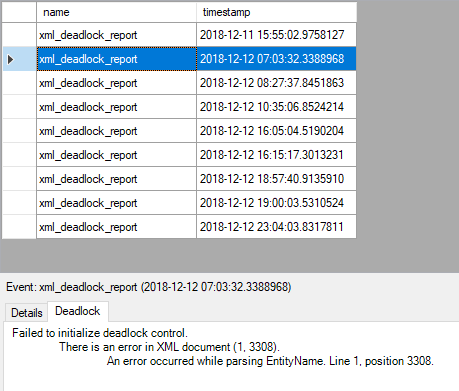
I notice whenever there is corruption in a single extended events deadlock report …

Capture
… sp_BlitzLock would not work at all …

Msg 9411, Level 16, State 1, Procedure sp_BlitzLock, Line 185 [Batch Start Line 12]
XML parsing: line 37, character 166, semicolon expected

My work-around was to replace line 196 …

AS ( SELECT CONVERT(XML, event_data) AS deadlock_xml

… with this …

AS ( SELECT CONVERT(XML, REPLACE(event_data,'&',';')) AS deadlock_xml

Whats New!

This very handy little script lists stored-procedures, tables, etc with the most recent at the top.

Great when you have been away, or even as the foundation of a migration tracking SSRS report.

-- WhatsNew.sql

SELECT [type_desc],
       (SELECT [name] FROM sys.schemas WHERE schema_id = ob.schema_id) [schema],
       CASE parent_object_id
           WHEN '0' THEN [name]
           ELSE OBJECT_NAME (parent_object_id) + '.' + [name]
       END [object_name],
       create_date,
       modify_date -- or create-date if there isn't one
FROM sys.objects ob
WHERE is_ms_shipped = 0 -- exclude system-objects
--AND [type] = 'P' -- just stored-procedures
-- ORDER BY [schema] DESC, modify_date DESC
ORDER BY modify_date DESC;

Audit Logins (light)

This is a partial update of my “DBA Audit” post, using code more suited to SQL 2014 and beyond.

Before a migration I created a job called “Audit Logins” scheduled to run every minute to help flag unused logins.

The first step ‘setup’ creates and populates a table with all enabled logins …

/* initial setup */

	/* create table */

	CREATE TABLE [master].[dbo].[LoginAudit] (
		LoginName VARCHAR(200), LastLoginDate DATETIME)

	/* populate with logins */

	INSERT INTO [master].[dbo].[LoginAudit] (LoginName, LastLoginDate)
		SELECT [name], NULL 
		FROM [master].[sys].[server_principals] 
		WHERE type  'R' /* is not a Role */
		AND is_disabled  1; /* is not Disabled */

Step-1 fails after the first run by design (as the table already exists) and continues onward with step-2 ‘update’ …

/* update logins */

	SELECT MAX(login_time) LoginTime, login_name LoginName
	INTO #LoginTempTable
	FROM [sys].[dm_exec_sessions]
	WHERE login_name  '' /* exclude ef */
	GROUP BY login_name;

	UPDATE [master].[dbo].[LoginAudit]
	SET LastLoginDate = tmp.LoginTime 
	FROM #LoginTempTable tmp
	WHERE LoginAudit.LoginName = tmp.LoginName;

I called it ~light as it is designed to have one row per login. Therefore if it is forgotten, and runs for years, the audit table will never grow.

Copying all tables to a new database

As part of an e-commerce re-write project I was tasked with copying over 300 tables from one database to another, including all data, identity columns, indexes, constraints, primary and foreign keys.

I was unable to simply backup / restore due to space and security issues. Here is my solution …

1. Script Create statements for every table. On the ‘old’ database I expanded the database and clicked ‘Tables’ then clicked ‘View’ / ‘Object Explorer Details’ so all the tables were listed in the right-hand pane. Then I was able to highlight all the tables there, and right-click ‘Script Table as’ / ‘Create To’ / ‘New Query Editor Window’.

When finished I changed connection to the ‘new’ empty database and ran the script to create all the tables – without data.

2. Disable all foreign-key constraints. (from here https://stackoverflow.com/questions/11639868/temporarily-disable-all-foreign-key-constraints). I ran this script on the new database …

-- disable fks
use targetdb
go

DECLARE @sql NVARCHAR(MAX) = N'';

;WITH x AS 
(
  SELECT DISTINCT obj = 
      QUOTENAME(OBJECT_SCHEMA_NAME(parent_object_id)) + '.' 
    + QUOTENAME(OBJECT_NAME(parent_object_id)) 
  FROM sys.foreign_keys
)
SELECT @sql += N'ALTER TABLE ' + obj + ' NOCHECK CONSTRAINT ALL;
' FROM x;

EXEC sp_executesql @sql;

3. Populate all the tables using the SSIS wizard. In SSMS I right-clicked the old database / ‘Tasks’, ‘Export Data…’. In the wizard I accepted the old database as the Source and typed in the new database details as the Target. I ticked all tables, and clicked ‘edit Mappings’ to tick ‘Enable identity insert’. I then deselected the Views, and executing the SSIS package.

4. To Re-enable all foreign keys – I ran this script (from the same web page as 2.) on the new database …

-- re-enable fks
use targetdb
go

DECLARE @sql NVARCHAR(MAX) = N'';

;WITH x AS 
(
  SELECT DISTINCT obj = 
      QUOTENAME(OBJECT_SCHEMA_NAME(parent_object_id)) + '.' 
    + QUOTENAME(OBJECT_NAME(parent_object_id)) 
  FROM sys.foreign_keys
)
SELECT @sql += N'ALTER TABLE ' + obj + ' WITH CHECK CHECK CONSTRAINT ALL;
' FROM x;

EXEC sp_executesql @sql;

To check progress I used my old ‘database_compare’ script.

Deadlocks from Entity Framework

Entity Framework was squirting raw SELECT statements at the database and causing deadlocks.

To fix, I captured the query text with sp_BlitzLock and executed it in Plan Explorer.

Plan Explorer confirmed that the data was being retrieved using a non-clustered index combined with the clustered-index (ahah!)

The Plan Explorer / Index Analysis tab, showed the non-clustered index had failed to retrieve over 15 columns.

I was able to create a new index that covered 100% of the columns within the Index Analysis screen.

I executed the query again to confirm it was no longer using the clustered index, and was therefore quicker and less likely to cause a deadlock.

Reducing index count

Sometimes its hard to see the wood for the trees. With over 30 indexes on a table of 50 columns I searched for some graphical way to list the columns against each index so I could easily see a) indexes that were totally encapsulated in a larger one. And b) almost identical indexes where a column (or two) could be added to one so the smaller could be dropped.

Initially it was sp_BlitzIndex that named the tables with too many indexes. The results from which I ran in SentryOne’s Plan Explorer like … select * from dbo.order_items; … or whatever.

Some time later :), in the Index Analysis tab I was able to choose tics to show every column and hey presto! The exact graphical tool I wanted 🙂 And a bonus of an easy way to manipulate them.

But watch out! you need another tool to rank the read/write ratio of each index before you start making changes (I use my old ‘indexmaint’ script).

Removing all duplicate rows

Just recording here an update to my old ‘having’ way to remove duplicate rows

WITH cte AS (
SELECT SomeColumnName,
row_number() OVER(PARTITION BY SomeColumnName ORDER BY SomeColumnName) AS [rn]
from [SomeDatabaseName].[dbo].[SomeTableName]
)
select * from cte where [rn] > 1 -- #1 test
-- delete cte where [rn] > 1 -- #2 execute

Removing unused databases

Here is my work-sheet for safely hiding databases from SSMS that I suspect are unused

-- DetachDB.sql

-- 1. List all attached databases with file paths

	SELECT db_name(database_id) [Database], Physical_Name
	FROM sys.master_files
	order by [Database]

-- 2. Create Attach Script for chosen db (accumulate history here)

	USE [master]; -- on some servername
	CREATE DATABASE xxx ON
	(FILENAME = 'D:\SQLData\xxx.mdf'),
	(FILENAME = 'D:\SQLLogs\xxx.ldf')
	FOR ATTACH;

	USE [master]; -- on some servername
	CREATE DATABASE Test ON
	(FILENAME = 'D:\SQLData\Test.mdf'),
	(FILENAME = 'D:\SQLLogs\Test_log.ldf')
	FOR ATTACH;

-- 3. Detatch Database

	USE [master];
	EXEC MASTER.dbo.sp_detach_db @dbname = N'xxx';

-- 4. To rollback, re-attach database (scripted in step-2)

Space Free

Central to my ‘Alert on low space’ job is this query, which is very handy by its self …

--spaceAlert.sql

select	volume_mount_point Drive, 
	cast(sum(available_bytes)*100 / sum(total_bytes) as int) as [Free%],
	avg(available_bytes/1024/1024/1024) FreeGB
from sys.master_files f
cross apply sys.dm_os_volume_stats(f.database_id, f.[file_id])
group by volume_mount_point
order by volume_mount_point;
 

TSQL Performance Rule #1

There’s no significance to this one being number one 🙂 its just the one I’ve just been thinking about 🙂 I may now have built this up a bit more than is warranted, so hope your not expecting too much from my number one performance rule. Oh, Ok then, here goes …

“All numbers in stored-procedures should be in single quotes”.

Even if they are defined as INT they could potentially force a VARCHAR to be converted to INT.

Consider WHERE SomeColumn = 42. Conversion precedency means VARCHAR’s will always be converted to INT’s never the other way around. The one numeric value above (42) could cause a million rows in the column (“SomeColumn”) to have to be converted to INT to be tested. Significantly affecting performance.

Consider WHERE SomeColumn = ’42’. “SomeColumn” is either numeric or non-numeric. If its INT then just one value (the ’42’ in the where clause) has to be converted to INT (taking no time at all). If “SomeColumn” is VARCHAR then there is no conversion.

Update Statistics on a whole database

Whilst performance tuning an SSRS report server I wanted to update all the statistics within the two databases ‘ReportServer’ and ‘ReportserverTempDB’.

I chose a simply-coded, two step method (for safety and to keep control).

First I generated the commands (per database) …

Select 'UPDATE STATISTICS [' + [name] + '] WITH FULLSCAN' 
from reportserver.sys.tables
Select 'UPDATE STATISTICS [' + [name] + '] WITH FULLSCAN' 
from reportservertempdb.sys.tables

… before executing them in a separate session.

Adding ‘All’ to a report drop-down list

There is a problem when you configure a report parameter to ‘Accept Multiply Items’, in that it won’t work with a stored procedure (SP).

One work-around is to only Accept Single Items, but make one of them ‘All’, like this …

1) Create a separate SP to populate the parameter and add an ‘All’ option …

SELECT 'All' CustId
UNION
SELECT DISTINCT CustomerId
FROM SomeTable
ORDER BY CustId

2) Then amend the main SP by joining to SomeTable, and adding a CASE statement in the WHERE clause, like so …

WHERE SomeTable.CustomerId = CASE WHEN @CustId != 'All' THEN @CustId ELSE SomeTable.CustomerId END

Which translates as …

WHERE SomeTable.CustomerId = SomeTable.CustomerId

… when ‘All’ is selected (which will let everything through), or …

WHERE SomeTable.CustomerId = @CustId

… where ‘All’ is Not selected.

This allows the user to select All or a single value.

However, if you need to select more than one value but not all values – you will need another approach. You will need to use a split-string function.

Preflight Checklist – Installing SQL 2016 Failover Cluster

How to Connect

  1. VPN: [SSL1.upcBroadband.com] (login using UIM account)
  2. [NL CSA P JUMP 001] (login using CSA account)
  3. 172.23.103.219 / 38 (login using CSA ADMIN account)

Nodes

  • Node1 Full Name (rdc ip): LG-W-P-DBS00007.CSA.INTERNAL (172.23.103.219)
  • Node2 Full Name (rdc ip): LG-W-P-DBS00008.CSA.INTERNAL (172.23.103.38)

IP’s

  • Cluster Management (node1 / node2): 172.23.103.219 / 172.23.103.38
  • SQL Server Instance: ??
  • DTC: ??

Drive Allocation

  • D. Media
  • E. Sys & TempDB
  • F. User ID
  • G. Logs
  • H. Backups etc

Collation

  • [SQL Latin1 General CP1 AS]

Windows Checks

  • Power saving NOT enabled
  • Instant File Initialization Enabled (secpol.msc, Local ~, User ~, Perform ~
  • Service Account


Configuring AG Read-Only Routing

The only non guessable setting was the “port” part of the Read-Only Routing URL. Luckily there’s a script to calculate it here …

https://docs.microsoft.com/en-us/archive/blogs/mattn/calculating-read_only_routing_url-for-alwayson

(Make sure you run this on each node as the ports may be wildly different)

The other relevant settings for me were:-

  • Readable Secondary: Read-intent only (on each replica)
  • Listener Port: 1433 (the default, just for simplicity sake)

To test read-only routing I ran this from a different SQL Server:-

sqlcmd -S ListenerName -d DatabaseName -E 
-q "SELECT @@SERVERNAME;" -K ReadOnly

Which returned the name of the secondary replica. I then ran it again without the “-K ReadOnly” which returned the name of the primary replica.

Configuring SQL 2014 Clustering

Practical High Availability (HA) my lists:-

– HA is measured in uptime (EG: five nines), zero data loss, automatic failover
– DR is measured in recovery time, minimal data loss, point-in-time recovery

Cluster – (AKA Windows Cluster, Failover Cluster) is an HA solution
Node – a server, part of a cluster, can support production by its self

Cluster prerequisites
– same architecture (32 bit / 64 bit)
– SQL Server
– same OS version (eg: Windows Server 2012/2016)
– (memory, cpu, patch-level, hardware, configuration)
– at least two nodes
– shared storage (eg’s: san, SCSI)
– common network (with no single point of failure

Cluster setup click-by-click …
– node-1, 2
– server manager
– add feature
– failover clustering
– iSCSI virtual disks
– 1 data, 2 log files, 3 quorum
– rescan storage
– new volume wizard 1, 2, 3
– size, drive letter, label (ie: Data, log, quorum)
– File and Storage Services
– iSCSI initiator
– target vsan ip
– quick connect
– auto configure (1, 2, 3)
– failover cluster manager
– validate configuration
– node1, node2, run all tests
– warning: only one network found (single point of failure) ignore if vm
– create cluster
– just add node-1 (simpler to identify/fix issues, eg: security)
– cluster name
– warning: network single-point-of-failure (ignore if vm)
– actions: add node (node-2) …

Install SQL Server (2014)
– node-1 (individual features)
– advanced, advanced cluster preparation *
– node-2 (individual features
– advanced, advanced cluster preparation **
– node-1 or 2 (common features)
– advanced cluster completion ***

* eg: – Database Engine Services (tic), Management tools – complete (tic)
– instance root directory etc – d-drive
– named instance
** repeat

*** – sql server network name (for dns / ad)
– cluster disk 1,3 (tic) not quorum
– cluster network configuration (type in) ip
– collation, mixed mode authentication, add self, add svc-account
– data directory (eg: g-drive), log directory (eg h-drive)

Test cluster #1
– failover cluster manager
– running / owner node (~1)
– move / pending
– running / owner node (~2)

Test cluster #2
– SSMS (3 queries)
– select @@servername
– select serverproperty(‘ComputerNamePhysicalNetBIOS’)
– select * from sys.dm_os_cluster_nodes — node-1 is up
– hard crash node-1
– repeat 3 queries (node-2 is up)

Log Space

I noticed a jump in logfile size the other day and was wondering how to predict a autogrowth event.

I know old data is truncated after a log-backup but that’s internal and not normally visable.

I came up with this to run across production …

--LogSpace.sql
-- To help find near-full logfiles that may autogrow soon.

-- create table to hold raw data
CREATE TABLE #temp (DBName varchar(100), SizeMB int, UsedPct float, [STATUS] bit)

-- populate table
INSERT #temp EXEC('DBCC SQLPERF(logspace)')

-- output
SELECT DBName, SizeMB, UsedPct FROM #temp --WHERE UsedPct > 90 -- 90% full

-- clean-up
DROP TABLE #temp

Making index changes to Production

These days I use a SQL Job called ‘DBA – index maint’.

Whenever I have an index change to make I paste the script into a new step, name that step with today’s date, change the ‘start step’ to that step, and schedule it to run once overnight.

This gives me a history and outcome, along-side the exact action.

SQL Safe error “Cannot connect to SQL Server instance”

This was fixed by re-installing SQL Safe. Bonus – Here is a working restore command with move

EXEC [master].[dbo].[xp_ss_restore] 
	@database = 'SomeDatabase',
	@filename = 'J:\backups\SomeDatabase.BAK', 
	@backuptype = 'Full',
	@withmove = 'SomeDatabase_data "J:\sql_data\SomeDatabase_data.mdf"',
	@withmove = 'SomeDatabase_log "J:\sql_log\SomeDatabase_log.ldf"',
	@recoverymode = 'recovery',
	@replace = '1';

Differential backup / restore using SQL Safe

I wanted to improve a backup / restore sql-job that populated a Reporting Server every night. I felt it would be quicker if it did a weekly Full backup and daily Diff backups.

The 3rd-party backup software was “SQL Safe Backup” from Idera.

I used this code on the Production Server …

--BackupDBA.sql

-- FULL Backup if Friday

	IF (SELECT DATEPART(dw, GETDATE())) = 6
	BEGIN
		EXEC [master].[dbo].[xp_ss_backup]
		@database = 'DBA',
		@filename = '\\ReportingServer\m$\DBA_Full.safe',
		@backuptype = 'Full',
		@overwrite = 1,
		@verify = 1;
	END;


-- DIFF Backup

	EXEC [master].[dbo].[xp_ss_backup]
	@database = 'DBA',
	@filename = '\\ReportingServer\m$\DBA_Diff.safe',
	@backuptype = 'Diff',
	@overwrite = 1,
	@verify = 1;

… and this code I scheduled a few hours later on the Reporting Server …

--RestoreDBA.sql

-- First, kill any connections

	DECLARE @kill VARCHAR(8000) = '';
	SELECT  @kill = @kill + 'kill ' + CONVERT(VARCHAR(5), spid) + ';'
	FROM    [master].[dbo].[sysprocesses]
	WHERE   dbid = DB_ID('DBA')
	AND spid > 50;
	EXEC (@kill);


-- Restore FULL

	EXEC [master].[dbo].[xp_ss_restore] 
	@database = 'DBA',
	@filename = 'M:\DBA_Full.safe', 
	@backuptype = 'Full',
	@recoverymode = 'norecovery', 
	@replace = '1';


-- Restore DIFF

	EXEC [master].[dbo].[xp_ss_restore] 
	@database = 'DBA',
	@filename = 'M:\DBA_Diff.safe', 
	@backuptype = 'Diff',
	@recoverymode = 'recovery', 
	@replace = '1';

Finally, I added a step on Reporting to repair the orphaned user-accounts …

USE [DBA]
GO

EXEC sp_change_users_login 'Auto_Fix', 'ReportingLogin';
EXEC sp_change_users_login 'Auto_Fix', 'LinkedServerLogin';
GO

TempDB Autogrowth

I was shocked to find TempDB was the most often autogrown in our environment – and changing them by hand soon got old.

Here’s my global script to set them to best-practice values, that will only change files that exist, and will fail if the specified size is less than the current size (IE: it fails safe).

--tempdb_autogrowth.sql

-- report size and growth
select name, size*8/1024 [sizeMB], growth*8/1024 [growthMB]
from master.sys.master_files
where db_name(database_id) = 'tempdb'
order by physical_name


-- resize datafile(s) to 256MB & logfile to 128MB
USE [master]
GO
begin try
ALTER DATABASE [tempdb] MODIFY FILE ( NAME = N'tempdev',  SIZE = 262144KB , FILEGROWTH = 262144KB );
ALTER DATABASE [tempdb] MODIFY FILE ( NAME = N'tempdev2', SIZE = 262144KB , FILEGROWTH = 262144KB );
ALTER DATABASE [tempdb] MODIFY FILE ( NAME = N'tempdev3', SIZE = 262144KB , FILEGROWTH = 262144KB );
ALTER DATABASE [tempdb] MODIFY FILE ( NAME = N'tempdev4', SIZE = 262144KB , FILEGROWTH = 262144KB );
ALTER DATABASE [tempdb] MODIFY FILE ( NAME = N'templog',  SIZE = 131072KB , FILEGROWTH = 131072KB );
end try begin catch end catch