We had a situation where a certain report needed to be accessed out of hours, when the report server was being refreshed. My solution was to include a drop-down list in the report called “Data Source”.
Then within the Data Source Properties I chose ‘build’ with a (temporary) static server name to get the login configured (which needs to be the same on both servers). Then amended the connection string by choosing ‘fx’ to construct something like this …
Note: Going forward, when working on reports with dynamic data sources I tend to change them back to ‘static’ and refresh the datasets before starting.
It’s relatively straight forward to write to a table from an SSRS report once you realise that every time a report is refreshed it tries to run any code it finds in its datasets. This gives us the opportunity to go “off campus”.
Consider a report with a drop-down list called “Change”, containing three choices “View” (the default), “Add”, and “Remove”. And a dataset containing …
    IF @Change = 'ADD'
        INSERT INTO [dbo].[SomeTable]
        VALUES (@Param1, @Param2);

    IF @Change = 'REMOVE'
        DELETE FROM [dbo].[SomeTable]
        WHERE Column1 = @Param1
		AND Column2 = @Param2;

	SELECT * FROM [dbo].[SomeTable];
You could open the report. Paste some values into Param1 and Param2. Choose “Add” from the drop-down. Then click “Refresh Report”.
Although I cannot show the slow report that returned 4729 pages (shame ;)) I can use the generic ReportServer database for a demo.
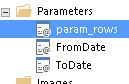
It’s all about timing. First we need a parameter called param_rows that is an integer with a default value of -say- 100.
Next we need a dataset where param_rows is nested …
-- SlowestReports.sql

DECLARE @Rows INT = COALESCE(@param_rows, 100)

SELECT TOP(@Rows) ItemPath Report,
       TimeStart,
       TimeDataRetrieval
FROM [ReportServer].[dbo].[ExecutionLog3]
WHERE ItemPath <> ''
AND ItemAction = 'Render'
AND RequestType = 'Interactive'
AND Status = 'rsSuccess'
AND TimeStart BETWEEN @FromDate AND @ToDate + 1
ORDER BY TimeDataRetrieval DESC;
Then we can abuse the date range, with performance balanced by the number of rows returned (unlike “Filter” which returns all the rows but limits those displayed) …
Ok abuse doesn’t really work with ReportServer (that only holds 60 days by default) but you get the idea 🙂
There are many posts on how to automatically generate of a PDF receipt and email it by leveraging SSRS. Here is how it went for me.
Create a report that shows the details required.
Create a parameters table.
Subscribe to the report using the parameters table.
Create a stored-procedure to populate and fire the subscription.
On a version of SQL Server Reporting Services (SSRS) that supports data-driven-subscriptions (DDS) I created a report called ‘SingleInvoice’ with one input parameter ‘invoice number’.
Outside of this report, in preparation for the DDS, I created a data source pointing to the local [ReportServer] database.
Within the [ReportServer] database I created a table called [dbo].[InvoiceParams]
CREATE TABLE [dbo].[InvoiceParams](
	[InvoiceNumber] [VARCHAR](100) NULL,
	[ToEmailAddress] [VARCHAR](200) NULL,
	[CCEmailAddress] [VARCHAR](200) NULL,
	[BccEmailAddress] [VARCHAR](200) NULL,
	[ReplyToEmailAddress] [VARCHAR](200) NULL,
	[IncludeReport] [BIT] NULL,
	[RenderFormat] [VARCHAR](20) NULL,
	[Priority] [VARCHAR](15) NULL,
	[Subject] [VARCHAR](150) NULL,
	[Comment] [VARCHAR](150) NULL,
	[IncludeLink] [BIT] NULL,
	[Active] [BIT] NULL,
	[DateInserted] [DATETIME] NOT NULL
) ON [PRIMARY]
GO

ALTER TABLE [dbo].[InvoiceParams] ADD  DEFAULT (NULL) FOR [CCEmailAddress]
ALTER TABLE [dbo].[InvoiceParams] ADD  DEFAULT (NULL) FOR [BccEmailAddress]
ALTER TABLE [dbo].[InvoiceParams] ADD  DEFAULT (NULL) FOR [ReplyToEmailAddress]
ALTER TABLE [dbo].[InvoiceParams] ADD  DEFAULT ((1)) FOR [IncludeReport]
ALTER TABLE [dbo].[InvoiceParams] ADD  DEFAULT ('PDF') FOR [RenderFormat]
ALTER TABLE [dbo].[InvoiceParams] ADD  DEFAULT ('Normal') FOR [Priority]
ALTER TABLE [dbo].[InvoiceParams] ADD  DEFAULT ((0)) FOR [IncludeLink]
ALTER TABLE [dbo].[InvoiceParams] ADD  DEFAULT ((1)) FOR [Active]
ALTER TABLE [dbo].[InvoiceParams] ADD  DEFAULT (GETDATE()) FOR [DateInserted]
GO
To simplify the stored procedure I defined default values for all the columns I would not be dynamically populating.
Next I created a Data-driven subscription on the report with a schedule in the past – so it would never fire. For Destination I chose E-Mail.
Within the subscription I edited the dataset and chose the previously created shared data source [ReportServer].
I added this query before clicking ‘Apply’….
SELECT *
FROM dbo.InvoiceParams
WHERE Active = 1;
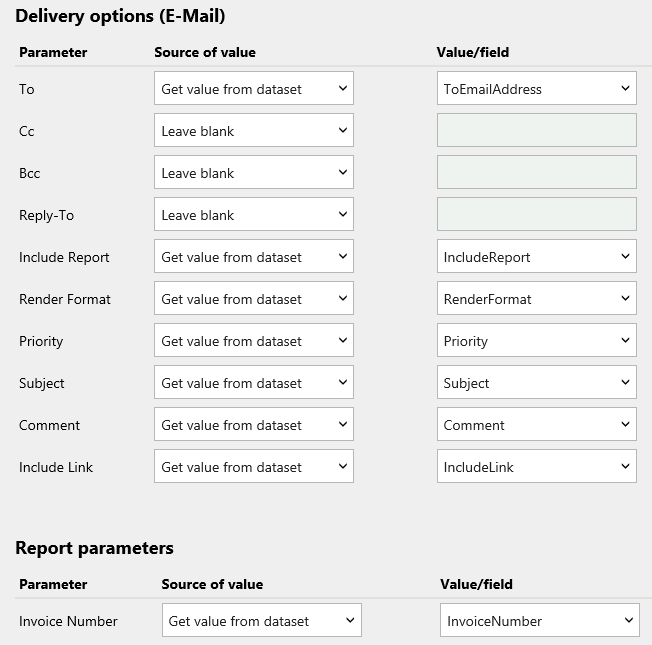
Back in the New Subscription form, I completed the Delivery options like this …
Within the user database I created this stored-procedure …
/*==================================================
  Author:		Richard Smith
  Create date:	10 Jul 2020
  Description:	To Email PDF receipts - demo version
  Test: Exec [dbo].[EmailReceipts] 'INV123456789',
            'Richard.Smith@company.com'
  =================================================*/

ALTER PROC [dbo].[EmailReceipts]
    @InvoiceNumber VARCHAR(100),
    @ToEmailAddress VARCHAR(200),
    @Subject VARCHAR(150) = 'test subject',
    @Comment VARCHAR(150) = 'test body',
    @SubscriptionID NVARCHAR(260) = '987654321'
                       /* Report = "SingleInvoice" */
AS
BEGIN
    SET NOCOUNT ON;


/* 1 Save the inputs */

    INSERT INTO [ReportServer].[dbo].[InvoiceParams]
            (InvoiceNumber, ToEmailAddress, [Subject], Comment)
    VALUES (@InvoiceNumber, @ToEmailAddress, @Subject, @Comment);


/* 2 Trigger subscription. Which will send the report (+ inputs) to the email-subsystem-queue */

    EXEC [ReportServer].[dbo].[AddEvent] @EventType = 'TimedSubscription', @EventData = @SubscriptionID;
    WAITFOR DELAY '00:00:10';


/* 3 If no longer in queue, flag as sent */

    IF NOT EXISTS (SELECT 1 FROM [ReportServer].[dbo].[Event] WHERE EventData = @SubscriptionID)
        UPDATE [ReportServer].[dbo].[InvoiceParams]
        SET Active = 0
        WHERE InvoiceNumber = @InvoiceNumber
        AND ToEmailAddress = @ToEmailAddress;


/* 4 Manage the log */

	DELETE FROM [ReportServer].[dbo].[InvoiceParams] WHERE DateInserted < GETDATE()-30;
	SELECT * FROM [ReportServer].[dbo].[InvoiceParams] ORDER BY DateInserted DESC;

END;
GO
When executed with an email address and invoice number this stored procedure will send an email to the email address with the PDF invoice attached.
NOTE
To find @SubcriptionID I used this …
SELECT SCH.SubscriptionID
FROM [ReportServer].[dbo].[Catalog] CAT
JOIN [ReportServer].[dbo].[ReportSchedule] SCH
  ON CAT.ItemID = SCH.ReportID
WHERE CAT.Path= '/ReportPath/ReportName';
I had an issue in SSRS where user configured subscriptions would always fail to find their email address (an email server configuration problem probably).
My work-around was to allow users to type in (or paste in) their full email addresses.
To do this I first created a copy of the reporting services configuration file “c:\ Microsoft SQL Server\ MSRS11.MSSQLSERVER\ Reporting Services\ ReportServer\ rsreportserver.config”.
Then edited the original in two places …
1) I changed [SendEmailToUserAlias]True[/SendEmailToUserAlias] to False.
2) Then I inserted the name of the SMTP Server into the middle of [DefaultHostName][/DefaultHostName].
NOTE: To find the name of the SMTP Server I opened Reporting Services Configuration Manager, and navigated to “E-Mail Settings”.
I commented out the line … (please note: I have replaced the greater-than and less-than symbols with square brackets. WordPress does not like those symbols in posts)
I had the odd request to add an extra column to a SQL 2008r2 “Report Model”. I had never heard of one of those, but it turned-out to be a type of amalgamated data-source that the users created there own ad-hock reports from (via Report Builder 1).
To add the extra column I just added it to the SQL View (which was named in the amalgamated data-source definition). Then to refresh the Report Model I downloaded it and uploaded it with a new name.
Had a tricky situation connecting Report Builder 3 to a cube. I was able to copy the connection string from withing SSDT but it still would not work.
I will use “Adventure Works” for illustration.
The solution was in the error message “Either the user, does not have access to the AdventureWorksDW2012 database, or the database does not exist.”
It turned out the database did not exist … as its SSMS Database-Engine name (“AdventureWorksDW2012”).
Connecting SSMS to Analysis Services however showed a different name “AdventureWorksDW2012Multidimensional-EE”
Plugging this into my connection string (with Data Source Type being Analysis services, and Connect Using being Windows Integrated Security) worked eg:-
Provider=SQLNCLI11.1;
Data Source=(ServerName\InstanceName);
Integrated Security=SSPI;
Initial Catalog=AdventureWorksDW2012Multidimensional-EE
Annoyingly (grrr!), I found just removing the Initial Catalog worked also (ah bah).
Whilst performance tuning an SSRS report server I wanted to update all the statistics within the two databases ‘ReportServer’ and ‘ReportserverTempDB’.
I chose a simply-coded, two step method (for safety and to keep control).
First I generated the commands (per database) …
Select 'UPDATE STATISTICS [' + [name] + '] WITH FULLSCAN'
from reportserver.sys.tables
Select 'UPDATE STATISTICS [' + [name] + '] WITH FULLSCAN'
from reportservertempdb.sys.tables
This was a new one to me! A user subscribed to an SSRS Report but only wanted to receive the email if the report contained data.
There seems to be loads of write-ups on the web about how to set this up. Here is how it went for me …
Firstly, I created the stored-procedure that would return rows from a live table that contained (business logic) errors (EG: “rep_exceptions”).
I created the report and subscribed to it (making sure to paste in my actual email address, not my login).
In the subscription form I specified both a start-date and an end-date that were in the past (ensuring the subscription would never actually fire, and ‘OK’ed the form.
Within SSMS “Job Activity Monitor” I located the job that had been created by this subscription (I looked for jobs that had never run, and then matched the start / end dates in the schedule with those I used in the subscription-form)
I copied the action statement from the job-step eg:
After changing a report Select statement into dynamic-sql I found “Select All” no longer worked for my “Customers” parameter.
To fix this, in Dataset/Properties/Parameters I changed the Parameter Value to
=join(Parameters!customer.Value,"','")
To translate … after the “.Value” there is … comma, double-quote, single-quote, comma, single-quote, double-quote, close-bracket. So that in the query each value would be surrounded by its own single quotes
simples 🙂
A customer had many copies of the same report – one for each site. And the application database had multiple copies of each table – one for each site. The table names were all appended with the sites name EG: “WP London_SalesHeader”, “WP Barcelona_SalesHeader” etc.
In Report Manager there was a folder for each site, containing sub-folders for different categories of report (EG: /London/Sales, OR /London/Production).
This is a simplified account of how I created a Report that returned only information specific to its location.
In Report Builder I created a hidden parameter called @site of type Text with no “Available Values” and its “Default Values” using the global variable ReportFolder.
As the output from this built-in variable would be like “\Paris\Sales” I had to create an expression for the “Default Value” of @site searching through each site name in turn …
The gauge’s in SSRS do not have an ‘auto’ option like the charts do.I wanted the ‘min-scale-vale’ on the 500 boundary below the lowest value and the ‘max-scale-value’ that was on the 500 boundary above the maximum value.



 Database Consultant