I notice the output from sp_BlitzLock surfaces object_id’s in the query column.
It is a simple matter to decode object_id’s like …
SELECT OBJECT_NAME(SomeNumber);
… where SomeNumber is the object id.
I notice the output from sp_BlitzLock surfaces object_id’s in the query column.
It is a simple matter to decode object_id’s like …
SELECT OBJECT_NAME(SomeNumber);
… where SomeNumber is the object id.
Sometimes its hard to see the wood for the trees. With over 30 indexes on a table of 50 columns I searched for some graphical way to list the columns against each index so I could easily see a) indexes that were totally encapsulated in a larger one. And b) almost identical indexes where a column (or two) could be added to one so the smaller could be dropped.
Initially it was sp_BlitzIndex that named the tables with too many indexes. The results from which I ran in SentryOne’s Plan Explorer like … select * from dbo.order_items; … or whatever.
Some time later :), in the Index Analysis tab I was able to choose tics to show every column and hey presto! The exact graphical tool I wanted 🙂 And a bonus of an easy way to manipulate them.
But watch out! you need another tool to rank the read/write ratio of each index before you start making changes (I use my old ‘indexmaint’ script).
Just recording here an update to my old ‘having’ way to remove duplicate rows
WITH cte AS ( SELECT SomeColumnName, row_number() OVER(PARTITION BY SomeColumnName ORDER BY SomeColumnName) AS [rn] from [SomeDatabaseName].[dbo].[SomeTableName] ) select * from cte where [rn] > 1 -- #1 test -- delete cte where [rn] > 1 -- #2 execute

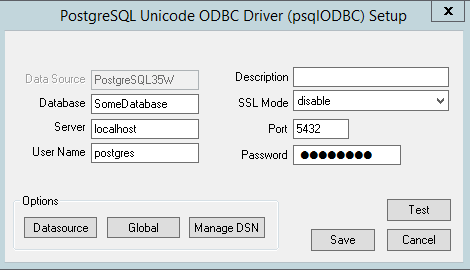
5. download the newest 32 bit postgresql driver (eg: psqlodbc_x64.msi)
6. install the driver (image) …

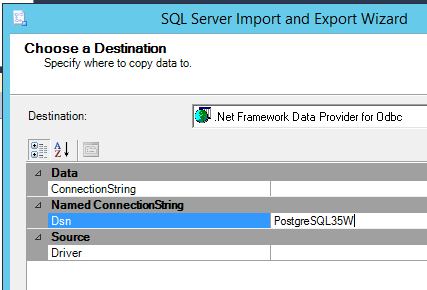
7. run SSIS export wizard (image) …

Where the wizard stops with an error use the following script to change the offending column to varchar(max). The idea at this stage is just to get the data in, in whatever form.
-- convertTablesForPg.sql
-- 1. to find tables with a named column, or
select
so.[name] table_name, sc.[name] column_name, st.[name] data_type
from sysobjects so
inner join syscolumns sc on (so.id = sc.id)
inner join systypes st on (st.[type] = sc.[type])
where so.[type] = 'U'
and sc.[name] = 'Email'
-- 1b. to find named tables
select
so.[name] table_name, sc.[name] column_name, st.[name] data_type,
'ALTER TABLE [dbo].[' + so.[name] + '] ALTER COLUMN [' + sc.[name] + '] VARCHAR(MAX);'
from sysobjects so
inner join syscolumns sc on (so.id = sc.id)
inner join systypes st on (st.[type] = sc.[type])
where so.[type] = 'U'
and so.[name] = 'translations'
ORDER BY 2
-- 2. to create command to change date/time/bit columns to varchar(max)
select
so.[name] table_name, sc.[name] column_name, st.[name] data_type,
'ALTER TABLE [dbo].[' + so.[name] + '] ALTER COLUMN [' + sc.[name] + '] VARCHAR(MAX);'
from sysobjects so
inner join syscolumns sc on (so.id = sc.id)
inner join systypes st on (st.[type] = sc.[type])
where so.[type] = 'U'
and st.[name] IN ('DATE', 'TIME', 'BIT')
ORDER BY 1,2,3
/* missed tables
[dbo].[BuyersBySupplierData]
*/
See me for part 2 😉
I wanted to standardize job error notifications, so created an new operator called ‘DBA’ (with multiple email addresses).
This code semi-automates the process of updating all the jobs by listing them, along with the code needed to change them …
/* ChangeNotifications.sql */
SELECT
J.[name] JobName,
O.[name] OperatorName,
O.email_address Email,
'EXEC msdb.dbo.sp_update_job @job_name = N''' + J.[name] + ''',
@notify_level_email=2,
@notify_email_operator_name = N''DBA''' CommandToChangeIt
FROM msdb..sysjobs J
LEFT JOIN msdb..sysoperators O
ON O.id = J.notify_email_operator_id
ORDER BY Email, JobName;
Although its inherently a bad idea to use a database server for application processes, and the built in function “sp_send_dbmail” can be a bit temperamental.
Never-the-less, the brief was to send emails this way, and individually (IE: no long strings of addresses).
The environment was mature, with a working Email Profile, a database and tables already in-place and holding HTML style emails ready to go.
-- SendEmailProcess.sql USE [SomeDatabase] GO CREATE PROCEDURE [dbo].[SendEmailProcess] @Test varchar(100) = null AS /* clear out the sysmail tables */ DELETE FROM [msdb].[dbo].[sysmail_allitems] /* parameters */ DECLARE @ID uniqueidentifier, @To varchar(100), @Subject varchar(255), @Html varchar(max), @Return int /* start of loop */ WHILE (SELECT COUNT(*) FROM [SomeDatabase].[dbo].[EmailMessage] EM JOIN [SomeDatabase].[dbo].[Recipient] R ON EM.Id = R.EmailMessage_Id2 WHERE EM.[Status] = 'Submitted') > 0 BEGIN /* get any one email message */ SELECT TOP 1 @ID = EM.ID, @To = isnull(@Test, R.EmailAddress), @Subject = EM.[Subject], @Html = EM.HtmlContent FROM [SomeDatabase].[dbo].[EmailMessage] EM JOIN [SomeDatabase].[dbo].[Recipient] R ON EM.Id = R.EmailMessage_Id2 WHERE EM.[Status] = 'Submitted'; /* send it */ EXEC [msdb].[dbo].[sp_send_dbmail] @profile_name = 'BulkMail', @recipients = @To, @subject = @Subject, @body = @Html, @body_format = 'HTML'; /* check it worked */ SET @Return = @@error /* if it worked - mark it as Sent */ IF @Return = 0 BEGIN UPDATE [SomeDatabase].[dbo].[EmailMessage] SET [Status] = 'Sent' WHERE Id = @ID END /* if it failed - flag it and move on */ IF @Return != 0 /* less-than greater-than does not work in WordPress */ BEGIN UPDATE [SomeDatabase].[dbo].[EmailMessage] SET [Status] = 'Failed' WHERE Id = @ID END /* end of loop */ END GO
I wanted to break-up a single 500GB MDF file into 5 files of around 100GB each, so created 4 NDF files.
I set autogrowth to 1024 MB for the NDF files and OFF for the MDF file.
In a SQL Job I used code like …
DBCC SHRINKFILE (N'MDFLogicalFileName', EMPTYFILE);
Which after the second weekend left about 88GB in the MDF file.
--datafiles.sql select Physical_Name, ROUND(CAST((size) AS FLOAT)/128,2) Size_MB, ROUND(CAST((FILEPROPERTY([name],'SpaceUsed')) AS FLOAT)/128,2) Used_MB, convert(int, ROUND(CAST((FILEPROPERTY([name],'SpaceUsed')) AS float)/128,2) / ROUND(CAST((size) AS float)/128,2) * 100) Used_Pct FROM sys.database_files where physical_name not like '%ldf%' order by physical_name;
I cancelled and deleted the job.
Over the next 3 week nights I reduced its physical size to 300GB, 200GB, then 100GB using a Job step like …
DBCC SHRINKFILE (N'MDFLogicalFileName', 100000);
I set MDF autogrowth to match the NDF files, so the five would naturally balance (size wise) over time.
Lastly I set up a nightly job to rebuild the most fragmented indexes (Thanks again Ola).
… I created a SQL Job on the Reporting server called “Restore from Live”.
Step-1 “Kill any connections”
Before a database can be restored it needs to be unused. Removing connections in this way is more reliable then changing the database to “Single-user-mode”.
DECLARE @kill VARCHAR(8000) = '';
SELECT @kill = @kill + 'kill ' + CONVERT(VARCHAR(5), spid) + ';'
FROM [master].[dbo].[sysprocesses]
WHERE dbid = DB_ID('LiveDatabaseName')
AND spid > 50;
EXEC (@kill);
Step-2 “Full Restore”
This step restores a Full backup. Changing the database name and file locations as required.
When complete the database will be left in a “Restoring” state. *It can be brought online either by completing the next step or by manual recovery EG: “Restore Database [LiveDatabaseName] with Recovery;”.
RESTORE DATABASE [LiveDatabaseName] FROM DISK = N'\\LiveServerName\SQLBackups\LiveDatabaseName\LiveDatabaseName_FULL.bak' WITH NORECOVERY, REPLACE;
Step-3 “Diff Restore”
This step restores a Diff backup similar to the last step, however it brings the database back online after completion. If this step ever fails see * above.
RESTORE DATABASE [LiveDatabaseName] FROM DISK = N'\\LiveServerName\SQLBackups\LiveDatabaseName\LiveDatabaseName_DIFF.bak' WITH RECOVERY;
Step-4 “Switch to Simple Recovery Mode”
This step changes the database to Simple recovery mode where the log-files are re-used and do not require management (EG: regular log backups). This is appropriate for report servers where the data is already backed up from live “for recovery” (IE: outside of the backups detailed in these 2 posts).
ALTER DATABASE [LiveDatabaseName] set recovery SIMPLE;
Step-5 “Remove Orphans”
This deprecated command changes the password for the “mssql” login to match the password from the “mssql” user. Login passwords are not captured by backups.
sp_change_users_login 'auto_fix', 'mssql';
Footnote
I wrote these 2 jobs using minimal variables and dynamic SQL, and using a generous number of jobs and job-steps, in the hope that this will be robust and easy to manage. (And because I really like simplifying such things)
Here is my work-sheet for safely hiding databases from SSMS that I suspect are unused
-- DetachDB.sql -- 1. List all attached databases with file paths SELECT db_name(database_id) [Database], Physical_Name FROM sys.master_files order by [Database] -- 2. Create Attach Script for chosen db (accumulate history here) USE [master]; -- on some servername CREATE DATABASE xxx ON (FILENAME = 'D:\SQLData\xxx.mdf'), (FILENAME = 'D:\SQLLogs\xxx.ldf') FOR ATTACH; USE [master]; -- on some servername CREATE DATABASE Test ON (FILENAME = 'D:\SQLData\Test.mdf'), (FILENAME = 'D:\SQLLogs\Test_log.ldf') FOR ATTACH; -- 3. Detatch Database USE [master]; EXEC MASTER.dbo.sp_detach_db @dbname = N'xxx'; -- 4. To rollback, re-attach database (scripted in step-2)
I had an issue in SSRS where user configured subscriptions would always fail to find their email address (an email server configuration problem probably).
My work-around was to allow users to type in (or paste in) their full email addresses.
To do this I first created a copy of the reporting services configuration file “c:\ Microsoft SQL Server\ MSRS11.MSSQLSERVER\ Reporting Services\ ReportServer\ rsreportserver.config”.
Then edited the original in two places …
1) I changed [SendEmailToUserAlias]True[/SendEmailToUserAlias] to False.
2) Then I inserted the name of the SMTP Server into the middle of [DefaultHostName][/DefaultHostName].
NOTE: To find the name of the SMTP Server I opened Reporting Services Configuration Manager, and navigated to “E-Mail Settings”.
Central to my ‘Alert on low space’ job is this query, which is very handy by its self …
--spaceAlert.sql
select volume_mount_point Drive,
cast(sum(available_bytes)*100 / sum(total_bytes) as int) as [Free%],
avg(available_bytes/1024/1024/1024) FreeGB
from sys.master_files f
cross apply sys.dm_os_volume_stats(f.database_id, f.[file_id])
group by volume_mount_point
order by volume_mount_point;
There is a fab new tool in SSMS 17.5 that helps with the GDPR spadework.
That is, the right of EU citizens to have their personal data deleted on request, enforceable from 25 May 2018.
To start right-click on a database, choose Tasks / Classify Data.
The wizard then searches the current database and attempts to classify table-columns into categories. For example a column called ‘mobile’ containing telephone numbers would be categorized as ‘contact Info’.
Then the wizard adds a sensitivity label (contact-info would be “Confidential – GDPR”)
Its a good idea to look at the actual data in a second screen whilst working down the recommendations list (in the first screen).
For each table-column you can accept / change / delete the recommendation.
Then, when you are done, you can save your work by clicking on “Accept selected recommendations”.
This is then saved within each databases system view called sys.extended_properties.
Be assured – that all selections can be changed / removed indefinitely, and that the tables / columns / data is not directly changed in any way.
The result, is a smart Report which can be printed or emailed out, demonstrating that you have it all under control 😉
There’s no significance to this one being number one 🙂 its just the one I’ve just been thinking about 🙂 I may now have built this up a bit more than is warranted, so hope your not expecting too much from my number one performance rule. Oh, Ok then, here goes …
“All numbers in stored-procedures should be in single quotes”.
Even if they are defined as INT they could potentially force a VARCHAR to be converted to INT.
Consider WHERE SomeColumn = 42. Conversion precedency means VARCHAR’s will always be converted to INT’s never the other way around. The one numeric value above (42) could cause a million rows in the column (“SomeColumn”) to have to be converted to INT to be tested. Significantly affecting performance.
Consider WHERE SomeColumn = ’42’. “SomeColumn” is either numeric or non-numeric. If its INT then just one value (the ’42’ in the where clause) has to be converted to INT (taking no time at all). If “SomeColumn” is VARCHAR then there is no conversion.
To shrink the TempDB MDF file (before adding additional NDF files for example), whilst retaining the total size of 50GB …
DBCC FREEPROCCACHE USE [tempdb] GO DBCC SHRINKFILE (N'tempdev' , 8192) GO
Finance wanted to export their reports into spread sheets but the company Logo and report Title were messing up the rendering.
To fix this I amended the SQL Server 2012 SSRS config file (called “rsreportserver.config“) after taking a copy.
The location of the config file was …
C:\Microsoft SQL Server\MSRS11.MSSQLSERVER\Reporting Services\ReportServer
I commented out the line … (please note: I have replaced the greater-than and less-than symbols with square brackets. WordPress does not like those symbols in posts)
[Extension Name="EXCELOPENXML" Type="Microsoft.ReportingServices.Rendering.ExcelOpenXmlRenderer.ExcelOpenXmlRenderer,Microsoft.ReportingServices.ExcelRendering"/]
… and replaced it with these 7 lines …
[Extension Name="EXCELOPENXML" Type="Microsoft.ReportingServices.Rendering.ExcelOpenXmlRenderer.ExcelOpenXmlRenderer,Microsoft.ReportingServices.ExcelRendering"] [Configuration] [DeviceInfo] [SimplePageHeaders]True[/SimplePageHeaders] [/DeviceInfo] [/Configuration] [/Extension]
To use this, I moved the report Logo and Title into a heading-block within the reports.
** UPDATE **
On another occasion I was unable to make this global change and resorted to making changes within individual reports.
The method was to right-click on the items to be hidden, choose properties, then Visibility. I pasted this expression into the appropriate box …
=IIF(Globals!RenderFormat.Name = "EXCELOPENXML", True, False)
Terms (SQL Server 2012, 2014, 2016, 2017 Enterprise)
AG = Availability Group = AlwaysOn Availability Group = SQL Server technology that protects one or more databases on a SQL Server instance as a logical group, for HA or DR.
Node = A Windows Server participating in an AG.
SQL Server Instance = A complete installation of SQL Server. Including user databases, system databases, logins, linked servers, jobs etc. A single default-instance plus a number of named-instances could be installed on one node.
Replica = the user database(s) being protected by an AG.
List (high level)
Configure Always On (Operating System)
– Enable windows clustering on each node
– Add participating nodes to cluster
– Validate cluster
– Create cluster
– Multi-subnet?
Configure Availability Groups (SQL Server)
– Enable AG on each SQL Server instance through config manager
– Create endpoint on each replica
– Grant connect on each endpoint/replica
– Create an AG (primary replica)
– Join each secondary to the new AG (secondary replicas)
Configure Databases (Database)
– Join database to AG
– Configure synchronous / asynchronous replication
– Configure manual / auto failover
– Configure read only / non read only secondary
Configure the Listener (Availability Group)
– Select IP for each subnet
– Configure listener
– Test listener
– Test failover
Configure Advanced Options
– Read only routing
– Offloading backups
– Failover behavior
– setup monitoring
I had the odd request to add an extra column to a SQL 2008r2 “Report Model”. I had never heard of one of those, but it turned-out to be a type of amalgamated data-source that the users created there own ad-hock reports from (via Report Builder 1).
To add the extra column I just added it to the SQL View (which was named in the amalgamated data-source definition). Then to refresh the Report Model I downloaded it and uploaded it with a new name.
Had a tricky situation connecting Report Builder 3 to a cube. I was able to copy the connection string from withing SSDT but it still would not work.
I will use “Adventure Works” for illustration.
The solution was in the error message “Either the user, does not have access to the AdventureWorksDW2012 database, or the database does not exist.”
It turned out the database did not exist … as its SSMS Database-Engine name (“AdventureWorksDW2012”).
Connecting SSMS to Analysis Services however showed a different name “AdventureWorksDW2012Multidimensional-EE”
Plugging this into my connection string (with Data Source Type being Analysis services, and Connect Using being Windows Integrated Security) worked eg:-
Provider=SQLNCLI11.1;
Data Source=(ServerName\InstanceName);
Integrated Security=SSPI;
Initial Catalog=AdventureWorksDW2012Multidimensional-EE
Annoyingly (grrr!), I found just removing the Initial Catalog worked also (ah bah).
Whilst performance tuning an SSRS report server I wanted to update all the statistics within the two databases ‘ReportServer’ and ‘ReportserverTempDB’.
I chose a simply-coded, two step method (for safety and to keep control).
First I generated the commands (per database) …
Select 'UPDATE STATISTICS [' + [name] + '] WITH FULLSCAN' from reportserver.sys.tables
Select 'UPDATE STATISTICS [' + [name] + '] WITH FULLSCAN' from reportservertempdb.sys.tables
… before executing them in a separate session.
This was a new one to me! A user subscribed to an SSRS Report but only wanted to receive the email if the report contained data.
There seems to be loads of write-ups on the web about how to set this up. Here is how it went for me …
Firstly, I created the stored-procedure that would return rows from a live table that contained (business logic) errors (EG: “rep_exceptions”).
I created the report and subscribed to it (making sure to paste in my actual email address, not my login).
In the subscription form I specified both a start-date and an end-date that were in the past (ensuring the subscription would never actually fire, and ‘OK’ed the form.
Within SSMS “Job Activity Monitor” I located the job that had been created by this subscription (I looked for jobs that had never run, and then matched the start / end dates in the schedule with those I used in the subscription-form)
I copied the action statement from the job-step eg:
EXECUTE [ReportServer].dbo.AddEvent @EventType='TimedSubscription', @EventData='5ec60080-b30c-4cfc-8571-19c4ba59aaac'
… into a new job. Then augmented it, to only run if there was data …
EXECUTE [ServerName].[dbo].[rep_exceptions] if @@ROWCOUNT > 0 EXECUTE [ReportServer].dbo.AddEvent @EventType='TimedSubscription', @EventData='5ec60080-b30c-4cfc-8571-19c4ba59aaac'
I scheduled the new-job to run every 8am.
Once this was all tested and working – I changed the SSRS subscription email address to the user (and left me as CC temporarily).
There is a problem when you configure a report parameter to ‘Accept Multiply Items’, in that it won’t work with a stored procedure (SP).
One work-around is to only Accept Single Items, but make one of them ‘All’, like this …
1) Create a separate SP to populate the parameter and add an ‘All’ option …
SELECT 'All' CustId UNION SELECT DISTINCT CustomerId FROM SomeTable ORDER BY CustId
2) Then amend the main SP by joining to SomeTable, and adding a CASE statement in the WHERE clause, like so …
WHERE SomeTable.CustomerId = CASE WHEN @CustId != 'All' THEN @CustId ELSE SomeTable.CustomerId END
Which translates as …
WHERE SomeTable.CustomerId = SomeTable.CustomerId
… when ‘All’ is selected (which will let everything through), or …
WHERE SomeTable.CustomerId = @CustId
… where ‘All’ is Not selected.
This allows the user to select All or a single value.
However, if you need to select more than one value but not all values – you will need another approach. You will need to use a split-string function.
By trial and error I found the answer is to just remove the space. For example to sort by the column “Recovery Model” …
import-module SQLPS; cls $smoserver = new-object microsoft.sqlserver.management.smo.server $smoserver.databases | sort-object RecoveryModel
How to Connect
Nodes
IP’s
Drive Allocation
Collation
Windows Checks
The only non guessable setting was the “port” part of the Read-Only Routing URL. Luckily there’s a script to calculate it here …
https://docs.microsoft.com/en-us/archive/blogs/mattn/calculating-read_only_routing_url-for-alwayson
(Make sure you run this on each node as the ports may be wildly different)
The other relevant settings for me were:-
To test read-only routing I ran this from a different SQL Server:-
sqlcmd -S ListenerName -d DatabaseName -E
-q "SELECT @@SERVERNAME;" -K ReadOnly
Which returned the name of the secondary replica. I then ran it again without the “-K ReadOnly” which returned the name of the primary replica.
1) Always use fully qualified names.
selecting from ‘2016’ may work initially as the engine returns the first object it finds with this name (which just so happens to be in the calendar dimension).
However after a time there may be a customer-number ‘2016’ (in the customer dimension) that will be returned erroneously.
2) A Tuple marks the co-ordinates of the data to be returned.
A list of comma separated dimensions that intersect on the required data. EG:
(customer 123, date 10/07/2016, sales-item 456).
3) A Set is a list of related objects
EG:{date 10/07/2016, date 11/07/2016, date 12/07/2016}. A Set can be a list of Tuples.
When an email server failed overnight I used this script to generate the commands to re-send reports to subscribers …
-- RerunFailedSubscriptions.sql -- generate the commands to resend report-emails that failed for some reason select s.LastStatus, LastRunTime, 'exec sp_start_job @job_name = ''' + cast(j.name as varchar(40)) + '''' [Command To Re-run the Job] from msdb.dbo.sysjobs j join msdb.dbo.sysjobsteps js on js.job_id = j.job_id join [ReportServer$REPORTS].[dbo].[Subscriptions] s on js.command like '%' + cast(s.subscriptionid as varchar(40)) + '%' where s.LastStatus like 'Failure sending mail%';
After changing a report Select statement into dynamic-sql I found “Select All” no longer worked for my “Customers” parameter.
To fix this, in Dataset/Properties/Parameters I changed the Parameter Value to
=join(Parameters!customer.Value,"','")
To translate … after the “.Value” there is … comma, double-quote, single-quote, comma, single-quote, double-quote, close-bracket. So that in the query each value would be surrounded by its own single quotes
simples 🙂
A customer had many copies of the same report – one for each site. And the application database had multiple copies of each table – one for each site. The table names were all appended with the sites name EG: “WP London_SalesHeader”, “WP Barcelona_SalesHeader” etc.
In Report Manager there was a folder for each site, containing sub-folders for different categories of report (EG: /London/Sales, OR /London/Production).
This is a simplified account of how I created a Report that returned only information specific to its location.
In Report Builder I created a hidden parameter called @site of type Text with no “Available Values” and its “Default Values” using the global variable ReportFolder.
As the output from this built-in variable would be like “\Paris\Sales” I had to create an expression for the “Default Value” of @site searching through each site name in turn …
=IIf(Globals!ReportFolder.Contains("Barcelona"),"WP Barcelona",
IIf(Globals!ReportFolder.Contains("Paris"),"WP Paris", "WP London"))
Finally, in the report query I derived the table name using the @site parameter.
declare @cmd varchar(max) = 'select [SalesCode], [Description], [NetWeight], [SalesDate] from [Production].[dbo].[' + @site + '_SalesHeader]' exec(@cmd)
(NB: As a best-practice I displayed the value of @site, along with the other parameter choices, in the report sub-title.)
I viewed our Report Configurations by running this against the Report Server database
Select * from dbo.ConfigurationInfo;
I then changed the number of days the log retained from the default 60 like this …
Update ConfigurationInfo SET Value='366' Where NAME='ExecutionLogDaysKept';
The gauge’s in SSRS do not have an ‘auto’ option like the charts do. I wanted the ‘min-scale-vale’ on the 500 boundary below the lowest value and the ‘max-scale-value’ that was on the 500 boundary above the maximum value.
For example …
ytd-Balance / ytd-Budget / min-scale / max-scale
865 / 1022 / 500 / 1500
2690 / 325 / 0 / 3000
5346 / 7453 / 5000 / 7500
… here’s the expressions …
=iif(Fields!bal.ValueFields!bud.Value, Int(Round(Fields!bud.Value/1000/1000,2)*2)*500,nothing))
=iif(Fields!bal.ValueFields!bud.Value,Int(Round(Fields!bal.Value/1000/1000,2)*2+1)*500,nothing))
Practical High Availability (HA) my lists:-
– HA is measured in uptime (EG: five nines), zero data loss, automatic failover
– DR is measured in recovery time, minimal data loss, point-in-time recovery
Cluster – (AKA Windows Cluster, Failover Cluster) is an HA solution
Node – a server, part of a cluster, can support production by its self
Cluster prerequisites
– same architecture (32 bit / 64 bit)
– SQL Server
– same OS version (eg: Windows Server 2012/2016)
– (memory, cpu, patch-level, hardware, configuration)
– at least two nodes
– shared storage (eg’s: san, SCSI)
– common network (with no single point of failure
Cluster setup click-by-click …
– node-1, 2
– server manager
– add feature
– failover clustering
– iSCSI virtual disks
– 1 data, 2 log files, 3 quorum
– rescan storage
– new volume wizard 1, 2, 3
– size, drive letter, label (ie: Data, log, quorum)
– File and Storage Services
– iSCSI initiator
– target vsan ip
– quick connect
– auto configure (1, 2, 3)
– failover cluster manager
– validate configuration
– node1, node2, run all tests
– warning: only one network found (single point of failure) ignore if vm
– create cluster
– just add node-1 (simpler to identify/fix issues, eg: security)
– cluster name
– warning: network single-point-of-failure (ignore if vm)
– actions: add node (node-2) …
Install SQL Server (2014)
– node-1 (individual features)
– advanced, advanced cluster preparation *
– node-2 (individual features
– advanced, advanced cluster preparation **
– node-1 or 2 (common features)
– advanced cluster completion ***
* eg: – Database Engine Services (tic), Management tools – complete (tic)
– instance root directory etc – d-drive
– named instance
** repeat
*** – sql server network name (for dns / ad)
– cluster disk 1,3 (tic) not quorum
– cluster network configuration (type in) ip
– collation, mixed mode authentication, add self, add svc-account
– data directory (eg: g-drive), log directory (eg h-drive)
Test cluster #1
– failover cluster manager
– running / owner node (~1)
– move / pending
– running / owner node (~2)
Test cluster #2
– SSMS (3 queries)
– select @@servername
– select serverproperty(‘ComputerNamePhysicalNetBIOS’)
– select * from sys.dm_os_cluster_nodes — node-1 is up
– hard crash node-1
– repeat 3 queries (node-2 is up)
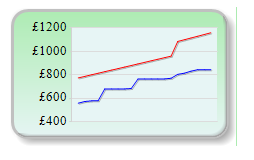
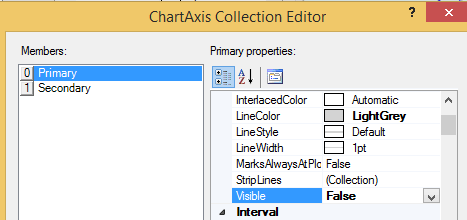
I deleted my Chart date/time axis for a cleaner look – but then changed my mind .

Within Report Builder 3 I recovered it by

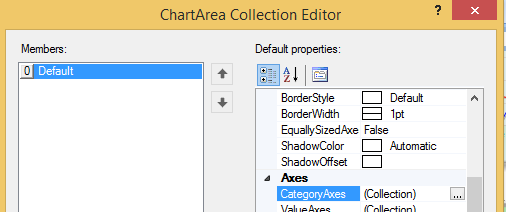
2. Clicking on the chart, then in the Properties pane navigating to Chart, Chart Areas …

3. I clicked on the ellipses (“…”) which brought up a chart-area properties box. Again I clicked the ellipses (next to Axis, Category Axis) …

4. Then changed the Visibility to ‘True’ …

Based on the work of GS, here is my script to create a Job that collects wait stats every 15 minutes.
--CreateJob_DBA_CollectWaitStats.sql
USE [msdb]
GO
IF EXISTS (SELECT job_id FROM msdb.dbo.sysjobs_view WHERE name = N'DBA_CollectWaitStats')
EXEC msdb.dbo.sp_delete_job @job_name=N'DBA_CollectWaitStats', @delete_unused_schedule=1
GO
USE [msdb]
GO
BEGIN TRANSACTION
DECLARE @ReturnCode INT
SELECT @ReturnCode = 0
IF NOT EXISTS (SELECT name FROM msdb.dbo.syscategories WHERE name=N'Database Maintenance' AND category_class=1)
BEGIN
EXEC @ReturnCode = msdb.dbo.sp_add_category @class=N'JOB', @type=N'LOCAL', @name=N'Database Maintenance'
IF (@@ERROR 0 OR @ReturnCode 0) GOTO QuitWithRollback
END
declare
@today varchar(50) = (select convert(varchar, getdate(), 112)),
@nextweek varchar(50) = (select convert(varchar, getdate()+8, 112)),
@dbname varchar(50) = 'master' --<<<<<>>>>>>>>
DECLARE @jobId BINARY(16)
EXEC @ReturnCode = msdb.dbo.sp_add_job @job_name=N'DBA_CollectWaitStats',
@enabled=1,
@notify_level_eventlog=0,
@notify_level_email=0,
@notify_level_netsend=0,
@notify_level_page=0,
@delete_level=0,
@description=N'Collects wait stats for performance tuning.',
@category_name=N'Database Maintenance',
@owner_login_name=N'sa', @job_id = @jobId OUTPUT
IF (@@ERROR 0 OR @ReturnCode 0) GOTO QuitWithRollback
EXEC @ReturnCode = msdb.dbo.sp_add_jobstep @job_id=@jobId, @step_name=N'Create the table',
@step_id=1,
@cmdexec_success_code=0,
@on_success_action=3,
@on_success_step_id=0,
@on_fail_action=3,
@on_fail_step_id=0,
@retry_attempts=0,
@retry_interval=0,
@os_run_priority=0, @subsystem=N'TSQL',
@command=N'create table [dbo].[WaitStats]
(
WaitType nvarchar(60) not null,
NumberOfWaits bigint not null,
SignalWaitTime bigint not null,
ResourceWaitTime bigint not null,
SampleTime datetime not null
)',
@database_name=@dbname,
@flags=0
IF (@@ERROR 0 OR @ReturnCode 0) GOTO QuitWithRollback
EXEC @ReturnCode = msdb.dbo.sp_add_jobstep @job_id=@jobId, @step_name=N'Collect current waits',
@step_id=2,
@cmdexec_success_code=0,
@on_success_action=1,
@on_success_step_id=0,
@on_fail_action=2,
@on_fail_step_id=0,
@retry_attempts=0,
@retry_interval=0,
@os_run_priority=0, @subsystem=N'TSQL',
@command=N'INSERT INTO [dbo].[WaitStats]
SELECT wait_type as WaitType,
waiting_tasks_count AS NumberOfWaits,
signal_wait_time_ms AS SignalWaitTime,
wait_time_ms - signal_wait_time_ms AS ResourceWaitTime,
GETDATE() AS SampleTime
FROM sys.dm_os_wait_stats
WHERE [wait_type] NOT IN (
N''BROKER_EVENTHANDLER'', N''BROKER_RECEIVE_WAITFOR'',
N''BROKER_TASK_STOP'', N''BROKER_TO_FLUSH'',
N''BROKER_TRANSMITTER'', N''CHECKPOINT_QUEUE'',
N''CHKPT'', N''CLR_AUTO_EVENT'',
N''CLR_MANUAL_EVENT'', N''CLR_SEMAPHORE'',
N''DBMIRROR_DBM_EVENT'', N''DBMIRROR_EVENTS_QUEUE'',
N''DBMIRROR_WORKER_QUEUE'', N''DBMIRRORING_CMD'',
N''DIRTY_PAGE_POLL'', N''DISPATCHER_QUEUE_SEMAPHORE'',
N''EXECSYNC'', N''FSAGENT'',
N''FT_IFTS_SCHEDULER_IDLE_WAIT'', N''FT_IFTSHC_MUTEX'',
N''HADR_CLUSAPI_CALL'', N''HADR_FILESTREAM_IOMGR_IOCOMPLETION'',
N''HADR_LOGCAPTURE_WAIT'', N''HADR_NOTIFICATION_DEQUEUE'',
N''HADR_TIMER_TASK'', N''HADR_WORK_QUEUE'',
N''KSOURCE_WAKEUP'', N''LAZYWRITER_SLEEP'',
N''LOGMGR_QUEUE'', N''MEMORY_ALLOCATION_EXT'',
N''ONDEMAND_TASK_QUEUE'',
N''PREEMPTIVE_XE_GETTARGETSTATE'',
N''PWAIT_ALL_COMPONENTS_INITIALIZED'',
N''PWAIT_DIRECTLOGCONSUMER_GETNEXT'',
N''QDS_PERSIST_TASK_MAIN_LOOP_SLEEP'', N''QDS_ASYNC_QUEUE'',
N''QDS_CLEANUP_STALE_QUERIES_TASK_MAIN_LOOP_SLEEP'',
N''QDS_SHUTDOWN_QUEUE'',
N''REQUEST_FOR_DEADLOCK_SEARCH'', N''RESOURCE_QUEUE'',
N''SERVER_IDLE_CHECK'', N''SLEEP_BPOOL_FLUSH'',
N''SLEEP_DBSTARTUP'', N''SLEEP_DCOMSTARTUP'',
N''SLEEP_MASTERDBREADY'', N''SLEEP_MASTERMDREADY'',
N''SLEEP_MASTERUPGRADED'', N''SLEEP_MSDBSTARTUP'',
N''SLEEP_SYSTEMTASK'', N''SLEEP_TASK'',
N''SLEEP_TEMPDBSTARTUP'', N''SNI_HTTP_ACCEPT'',
N''SP_SERVER_DIAGNOSTICS_SLEEP'', N''SQLTRACE_BUFFER_FLUSH'',
N''SQLTRACE_INCREMENTAL_FLUSH_SLEEP'',
N''SQLTRACE_WAIT_ENTRIES'', N''WAIT_FOR_RESULTS'',
N''WAITFOR'', N''WAITFOR_TASKSHUTDOWN'',
N''WAIT_XTP_RECOVERY'',
N''WAIT_XTP_HOST_WAIT'', N''WAIT_XTP_OFFLINE_CKPT_NEW_LOG'',
N''WAIT_XTP_CKPT_CLOSE'', N''XE_DISPATCHER_JOIN'',
N''XE_DISPATCHER_WAIT'', N''XE_TIMER_EVENT'')
AND [waiting_tasks_count] > 0
',
@database_name=@dbname,
@flags=0
IF (@@ERROR 0 OR @ReturnCode 0) GOTO QuitWithRollback
EXEC @ReturnCode = msdb.dbo.sp_update_job @job_id = @jobId, @start_step_id = 1
IF (@@ERROR 0 OR @ReturnCode 0) GOTO QuitWithRollback
EXEC @ReturnCode = msdb.dbo.sp_add_jobschedule @job_id=@jobId, @name=N'Every 15 mins for a week',
@enabled=1,
@freq_type=4,
@freq_interval=1,
@freq_subday_type=4,
@freq_subday_interval=15,
@freq_relative_interval=0,
@freq_recurrence_factor=0,
@active_start_date=@today,
@active_end_date=@nextweek,
@active_start_time=100,
@active_end_time=235959,
@schedule_uid=N'5b0842fe-8f80-44e9-8a09-aac6ce5c2b2e'
IF (@@ERROR 0 OR @ReturnCode 0) GOTO QuitWithRollback
EXEC @ReturnCode = msdb.dbo.sp_add_jobserver @job_id = @jobId, @server_name = N'(local)'
IF (@@ERROR 0 OR @ReturnCode 0) GOTO QuitWithRollback
COMMIT TRANSACTION
GOTO EndSave
QuitWithRollback:
IF (@@TRANCOUNT > 0) ROLLBACK TRANSACTION
EndSave:
GO
--hek_template.sql -- 1) add filegroup (if not already there) USE [master] GO begin try ALTER DATABASE [DemoDW] ADD FILEGROUP [MemoryOptimizedFG] CONTAINS MEMORY_OPTIMIZED_DATA end try begin catch end catch -- 2) add filestream file into filegroup (unless already done) USE [master] GO begin try ALTER DATABASE [DemoDW] ADD FILE ( NAME = N'DemoDB_hek', FILENAME = N'C:\Program Files\Microsoft SQL Server\MSSQL12.SQL2014\MSSQL\DATA\DemoDB_hek' ) TO FILEGROUP [MemoryOptimizedFG] end try begin catch end catch -- 3) remove table if it already exists USE [DemoDW] GO begin try drop table recentsales end try begin catch end catch -- 4) create memory optimized table (hekaton!) USE [DemoDW] GO create table recentsales ( ItemID int NOT NULL PRIMARY KEY NONCLUSTERED HASH (ItemID) with (BUCKET_COUNT=1024), [Name] varchar NOT NULL, Price decimal NOT NULL ) with (MEMORY_OPTIMIZED = ON, DURABILITY = SCHEMA_AND_DATA )
A Cluster is a single, complete, running, PostgreSQL server (IE: cluster of databases)
Operations done on a Cluster:
Objects defined at Cluster level
Maintenance Tasks
Warnings: (unless you know what you are doing …)
Read the manual
Security
Upgrades
Extensions
Scripts
Schema Change: adding a foreign key now split into two parts :-
Features
Tasks
Download from Enterprise DB, gui is the one to go for, remember xhost on linux
1. Install. For prod you should indicate that data files are stored independently of the source tree. A ‘Cluster’ is not a classic Cluster IE: a Server Cluster, just means all the databases on this particular box.
2. Explore the footprint of the install. ‘\\bin\ contains utilities like psql.exe (terminal monitor). \\data\ contains all databases and 3x config files & pg_log/ (log files), pg_xlog/ (write ahead log folder). postmaster.opts (startup options)
3. Provide access to internal docs via web-browser bookmark eg: file:///C:/Program%20Files/PostgreSQL/9.5/doc/postgresql/html/index.html
4. Add \\bin file to path – for psql.exe etc (eg: C:\Program Files\PostgreSQL\9.5\bin). posqlgresql clients default to submitting the current logged-in users name as the DB user name (eg: “psql” without -U will assum user is windows-user).
5. Add system variable ‘PGUSER=postgres’ workaround so psql etc wont try to login to utilities as o/s-user
For Rob & Karl – Triggers run outside of transactions. An insert that fires a trigger may be rolled back, but the trigger rolls on.
Triggers introduce a long-term maintenance headache. You can read a stored-procedure from top to bottom and imagine you understand what it does. But unless you examine every tables it touches – you don’t. Little bits of code may be running silently which augment or even reverse some of the logic within the stored-procedure.
Triggers are used by lazy developers to ‘bolt on’ new features to applications, rather than track-down all the code that could insert/update/delete from a table and add the code (or a link to it) there.
This would be forgivable if the application code was closed or propitiatory, but never when the application is open to the application developer, who just cannot be bothered to integrate code changes properly, and cares not-a-jot about long-term maintenance headaches (slow breaths, slow breaths :))
Scripting languages are wonderful things. They use subsets of English and are therefore easy to learn (EG: update, delete, get, put).
However capitalization is totally redundant. A capital letter marks the beginning of a sentence, but scripts do not use sentences.
One alphabet is enough (a to z) who needs another one (A to Z) that is completely equivalent?
Imagine responding to the adhoc query “Please email me a list of most ordered items over Christmas” with “in what font?” lol
Although … one trick that I have used over the years, with having two alphabets, is to temporarily change the capitalization of text to double-check for myself that Replication etc is actually working (before the days of tracer-token poo sticks). Changing the data look without changing the data value.
Another sneaky trick is making mass changes to data whilst adding a flag (to only the changed data). For example changing every field containing ‘unsubscribe’ to ‘uNsubscribe’, or ‘yes’to ‘yEs’.
And then repeating with un-flagged fields until only ‘unsuscribe’ or ‘Yep’ remain (lol).
This (typical DBA belt & braces) method almost always guarantees you will not induce any unintended processing errors further down the line, as the data always remains the same length, type and meaning.
Autonomy, Mastery, and Purpose.
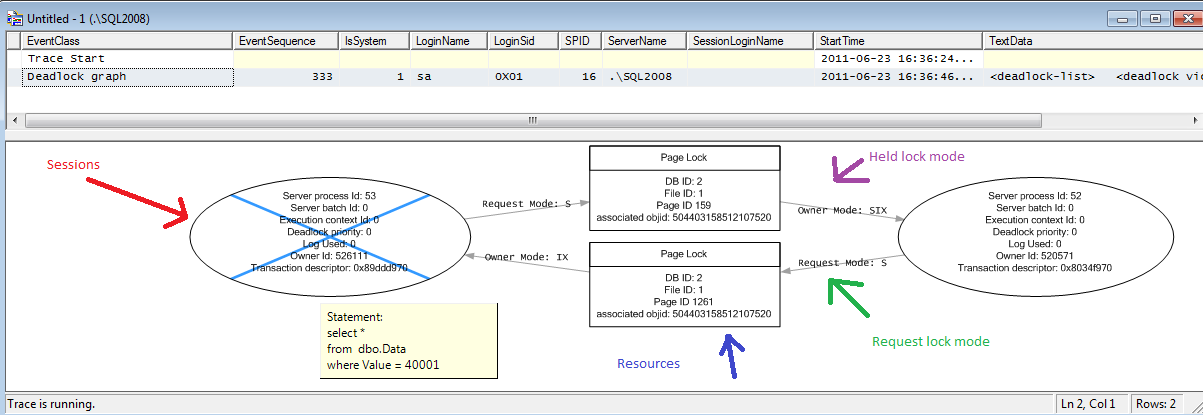
In a SQL deadlock graph the direction of the arrows is an interesting thing.

With my mechanistic head on, I am imagining it as …
To Capture a Deadlock Graph using Profiler (NB: with SQL 2008 and above you can also use an extended-event).
I noticed a log-shipping RESTORE job had started failing. Looking back through the job history I found the last two “good” executions contained errors …
*** Error: Could not apply log backup file ‘SomePath\SomeFile.trn’ to secondary database. The volume is empty.
I looked at the path\file specified and found the file was zero size.
I looked on the network-share where the files are backed-up-to \ copied-from, and found the same file was NOT zero size.
I manually copied the file from the network-share to the destination folder (on the DR server), overwriting the empty file.
Log-shipping recovered over the next few hours.
I was unable to cobble together some Powershell code that I could execute within a job-step to check our linked-servers were working.
So I resorted to making the best of the built-in, but flawed, “SP_testlinkedserver” (Its a flawed procedure as if a link fails, it crashes, slowly).
The code below, when ran in a job-step overnight, will dynamically create one job for each linked-server on the box. The job(s) will then run and email the “DBA” operator every linked-server that fails, before deleting themselves.
-- testlinkedservers.sql
-- get list of all linked servers on this box
CREATE TABLE #temp (
srv_name varchar(MAX),
srv_providername varchar(MAX),
srv_product varchar(MAX),
srv_datasource varchar(MAX),
srv_providerstring varchar(MAX),
srv_location varchar(MAX),
srv_cat varchar(MAX))
INSERT INTO #temp EXEC sp_linkedservers
DELETE FROM #temp WHERE srv_name LIKE 'LOGSHIP%'
DELETE FROM #temp WHERE srv_name = @@SERVERNAME
-- loop
DECLARE @name VARCHAR(MAX), @cmd VARCHAR(MAX), @run VARCHAR(MAX)
WHILE (SELECT COUNT(*) FROM #temp) > 0
BEGIN
SELECT TOP 1 @name = srv_name FROM #temp
-- create the job code
SET @cmd = 'BEGIN TRANSACTION
DECLARE @jobId BINARY(16)
SELECT @jobId = job_id FROM msdb.dbo.sysjobs WHERE (name = N''DBA - LinkedServerTest ' + @name + ''')
IF (@jobId IS NULL)
BEGIN
EXEC msdb.dbo.sp_add_job @job_name=N''DBA - LinkedServerTest ' + @name + ''',
@enabled=1,
@notify_level_eventlog=2,
@notify_level_email=2,
@notify_level_netsend=0,
@notify_level_page=0,
@delete_level=3,
@description=N''No description available.'',
@category_name=N''[Uncategorized (Local)]'',
@owner_login_name=N''sa'',
@notify_email_operator_name=N''DBA'',
@job_id = @jobId OUTPUT
END
-- create the job-step code
IF NOT EXISTS (SELECT * FROM msdb.dbo.sysjobsteps WHERE job_id = @jobId AND step_id = 1)
EXEC msdb.dbo.sp_add_jobstep @job_id=@jobId, @step_name=N''one'',
@step_id=1,
@cmdexec_success_code=0,
@on_success_action=1,
@on_success_step_id=0,
@on_fail_action=2,
@on_fail_step_id=0,
@retry_attempts=0,
@retry_interval=0,
@os_run_priority=0, @subsystem=N''TSQL'',
@command=N''sp_testlinkedserver [' + @name + ']'',
@database_name=N''master'',
@flags=0;
-- create instantiation code
EXEC msdb.dbo.sp_add_jobserver @job_id = @jobId, @server_name = N''(local)''
COMMIT TRANSACTION'
-- create the job
EXEC(@cmd)
-- run the job
SET @run = 'EXECUTE msdb.dbo.sp_start_job ''DBA - LinkedServerTest ' + @name + ''''
EXEC(@run)
-- move to next row in loop
DELETE FROM #temp WHERE srv_name = @name
END
.
After a virtualization issue caused an unscheduled rebooted of production, I found the DR (log-shipping) monitor incorrectly reporting issues.
It seems the linked-server was no longer working, as @@servername returned NULL on Prod.
On Production SP_AddServer failed as the servername was in sys.servers – but not with server_id 0 (as needed for @@servername).
Removing the incorrect entry with SP_DropServer failed as there were remote- connections using it. And SP_DropRemoteLogin failed as there was not a remote users called NULL.
The fix was to remove log-shipping first using the GUI, which was only partially successful. Then manually, by deleting jobs from prod and DR, and truncating system-tables in MSDB starting log_shipping~ (on both servers).
Once log-shipping was cleaned off both machines I could use … EXEC SP_DropServer ‘ProdServer’, ‘droplogins’ followed by EXEC SP_AddServer ‘ProdServer’, LOCAL successfully. Now the server-name was correctly at the top of sys.servers the only task left was to schedule a reboot so Select @@ServerName would pick-up the new value.
After which I could re-configure log-shipping.
Diff restores have to happen directly after a full restore, and will fail if a full backup was taken between the two being restored.
I wanted to move about 50 databases on a Sharepoint server off the C-drive
(yes I know).
Sadly the only place I could move both datafiles and logfiles to was the D-Drive
(I know, I know).
Here’s the code I wrote to help me …
--move_db.sql
-- to move a user-database to different-drives on the same-server
USE [master]
GO
-- backup
DECLARE @dbname VARCHAR(max) = 'SomeDatabaseName' -- database name
DECLARE @backup_cmd VARCHAR(MAX) = 'BACKUP DATABASE ['+ @dbname + ']
TO DISK = N''\\SomeNetworkShare\SomeServerName_' + @dbname + '.bak''
WITH INIT, COMPRESSION, STATS = 1;'
SELECT (@backup_cmd)
--EXEC (@backup_cmd)
-- kill connections
DECLARE @kill_cmd VARCHAR(MAX) = 'DECLARE @kill varchar(8000) = '''';
SELECT @kill=@kill+''kill ''+convert(varchar(5),spid)+'';'' from master..sysprocesses
WHERE dbid=db_id(''' + @dbname + ''') and spid>50;
EXEC (@kill);'
SELECT (@kill_cmd)
--EXEC (@kill_cmd)
-- restore
DECLARE @restore_cmd VARCHAR(MAX) = 'RESTORE DATABASE [' + @dbname + ']
FROM DISK = N''\\SomeNetworkShare\SomeServerName_' + @dbname + '.bak''
WITH FILE = 1,
MOVE N''' + @dbname + ''' TO N''D:\SQL_Data\' + @dbname + '.mdf'',
MOVE N''' + @dbname + '_log'' TO N''D:\SQL_Log\' + @dbname + '_log.ldf'',
REPLACE, STATS = 1;'
SELECT (@restore_cmd)
--EXEC (@restore_cmd)